Connect Odoo to Power BI: a step-by-step guide
Connect Power BI to Odoo: what your hosting allows, a read-only PostgreSQL role, the useful tables and three queries tested on a real Odoo instance.
Yes, Power BI connects to Odoo, but how depends on where your Odoo runs. Installed on your own servers, or on Odoo.sh with dedicated hosting, Odoo keeps its data in a PostgreSQL database, which the free Power BI Desktop reads with its built-in connector. On Odoo Online, Odoo’s SaaS, you have no access to the database: what remains is Odoo’s API, only available on its Custom plan, or Excel exports.
To write this guide, we ran a real Odoo 18 instance from the official Docker image: Invoicing and Sales apps, the French chart of accounts and Odoo’s demo data. We added 250 fictional orders over 22 months, entered through Odoo’s API the way a salesperson would: quotation, order, invoice, payment. Every query in this guide ran on that database, then on Odoo 20. The screenshots are in French, like our test company.
Where does your Odoo run?
This is the first question, because it decides everything. Your Odoo partner knows the answer.
- On your own servers (or at your hosting provider), Community or Enterprise edition: the PostgreSQL database is yours and Power BI can read it. By default, PostgreSQL only accepts connections from its own machine: you will need to open access for the computer that links it to Power BI.
- Odoo.sh, dedicated hosting: Odoo offers read-only external PostgreSQL access, intended for BI tools among others. The connection must be encrypted (SSL), and Odoo lists Power BI among the tested tools.
- Odoo.sh, shared hosting: no database access. Odoo asks you to integrate over HTTP, which means through its API.
- Odoo Online: no database access either. You can download a backup from Odoo’s database manager, but it is a snapshot, not a source that refreshes. That leaves the API and exports.
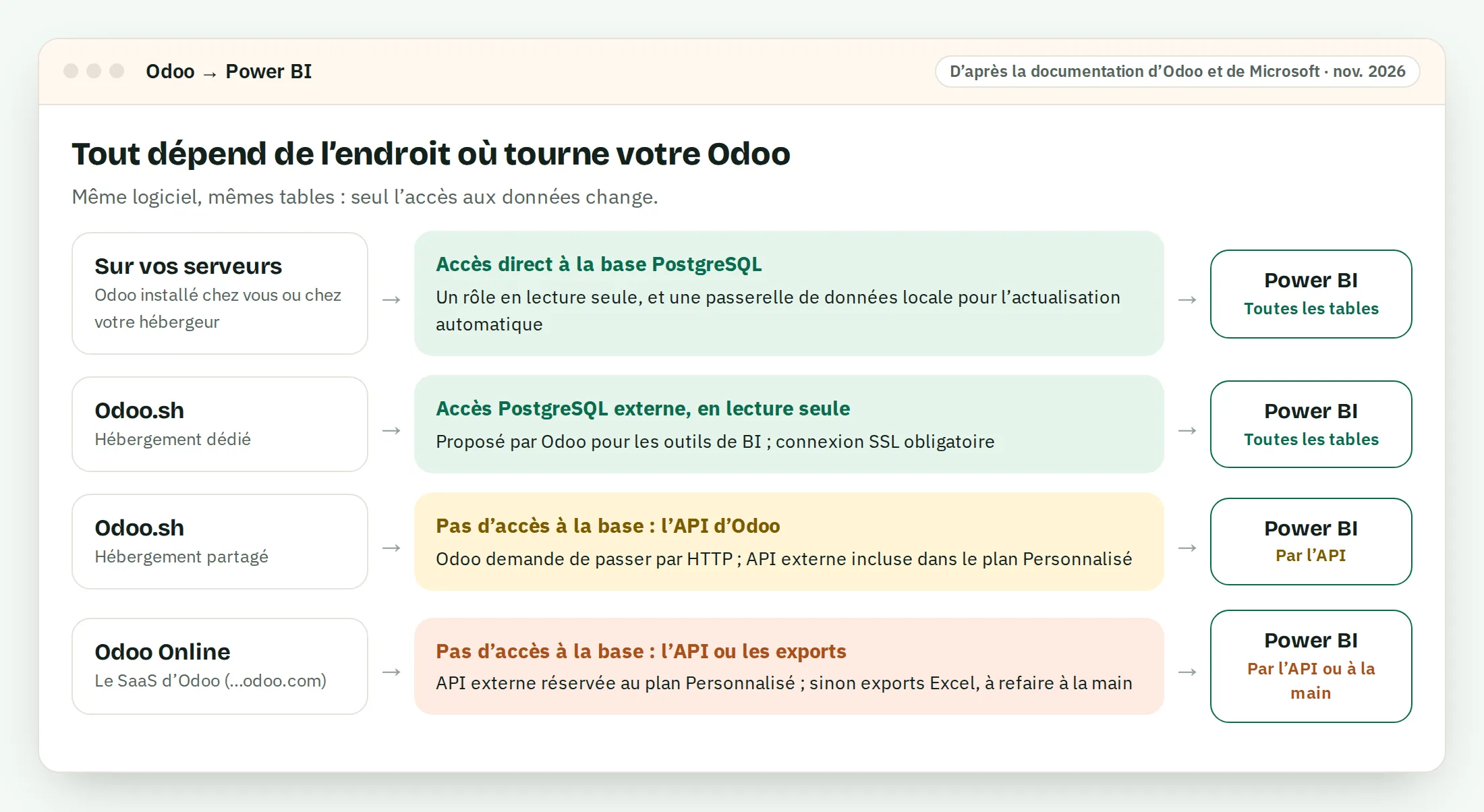
KAVDAL diagram, based on Odoo and Microsoft documentation accessed on 8 November 2026.
Four ways to link Power BI and Odoo
| Method | For whom | Limits |
|---|---|---|
| Power BI PostgreSQL connector (recommended) | Odoo on your servers, dedicated Odoo.sh | A read-only role to create, network access to open, a gateway for online refresh |
| Odoo external API | Odoo Online, shared Odoo.sh | Custom plan required; no SQL, calls are written in Power Query; keys to renew |
| Excel exports | Everyone | Manual, redone at every update; large exports can time out |
| Third-party apps from the Odoo Apps Store | Odoo on your servers or on Odoo.sh | Paid, from third-party vendors; Odoo says they cannot be installed on Odoo Online |
Microsoft does not offer an Odoo connector in Power BI: its official connector list has none. When the database is reachable, the PostgreSQL connector built into Power BI does the job very well.
Step by step: connect Power BI to the Odoo database
1. Create a read-only role, limited to the tables you need
Never connect Power BI with Odoo’s PostgreSQL user: it can change everything. And do not grant read access to the whole database either. It also holds Odoo’s user accounts, with their password hashes, and the instance’s secret settings. Odoo says it plainly: raw SQL bypasses its security rules. So limiting what can be read is up to you.
Your administrator or Odoo partner runs this script once, connected to the Odoo database as its owner:
-- Connected to the Odoo database as its owner (often the "odoo" user)
CREATE ROLE powerbi_read LOGIN PASSWORD 'a long, unique password';
ALTER ROLE powerbi_read SET default_transaction_read_only = on;
GRANT CONNECT ON DATABASE my_odoo_db TO powerbi_read;   -- your database name
GRANT USAGE ON SCHEMA public TO powerbi_read;
GRANT SELECT ON account_move, account_move_line, account_account, account_journal,
                res_partner, res_company, sale_order, sale_order_line,
                product_product, product_template, product_category
  TO powerbi_read;
-- Optional: remove every role's right to create tables (see below)
REVOKE CREATE ON SCHEMA public FROM PUBLIC;
We tested this script on our database, from another container and with the password, as Power BI would connect. The role reads the invoices. PostgreSQL refuses it the users table (res_users), the settings table (ir_config_parameter), any change to an invoice and any table creation.
The last line comes from that test. When it creates a database, Odoo gives every PostgreSQL role the right to create tables in the public schema, to keep PostgreSQL’s old behaviour. We saw it on Odoo 18 and on Odoo 20. Removing that right does not bother Odoo when it connects as the database owner. If that is not your setup, check with your Odoo partner first.
2. Open network access
On a self-hosted Odoo, PostgreSQL only listens to its own machine by default. Your administrator adds the address of the computer that links it to Power BI (the listen_addresses and pg_hba.conf settings, described in Odoo’s documentation), and nothing more. Prefer SSL encryption: without it, Power BI shows a warning before connecting.
On Odoo.sh with dedicated hosting, SSL is mandatory. Odoo notes that a few tools are not compatible with this access (pgAdmin, Qlik Sense), but that Power BI has been tested.
3. Connect Power BI Desktop
In the free Power BI Desktop: Get data, then PostgreSQL database. Nothing to install: the PostgreSQL provider (Npgsql) has shipped with Power BI Desktop since December 2019.
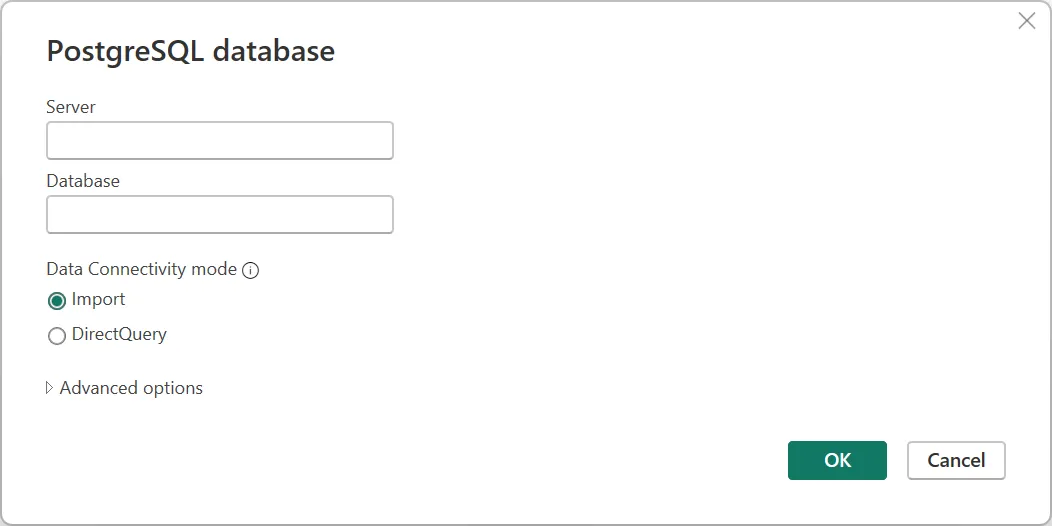
Screenshot: Microsoft, Power Query documentation (learn.microsoft.com), licensed CC BY 4.0, unmodified.
- Server: the PostgreSQL server name or address, for example
odoo-server:5432. - Database: your Odoo database name.
- Mode: choose Import. Power BI copies the data at refresh time instead of querying the live database at every click.
- Credentials: the Database tab, with the
powerbi_readrole.
Best of all, paste a SQL query under Advanced options, like the ones below: Power BI then loads only the columns and rows you need.
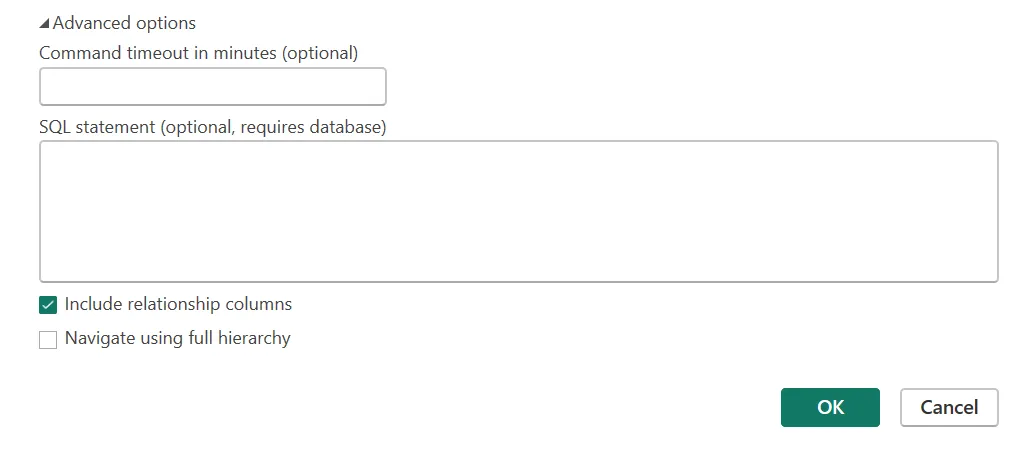
Screenshot: Microsoft, Power Query documentation (learn.microsoft.com), licensed CC BY 4.0, unmodified.
The Odoo tables you need
An Odoo database holds hundreds of tables: nearly 400 in ours, with only the Invoicing and Sales apps. A manager’s dashboard needs about ten, and their names say what they contain.
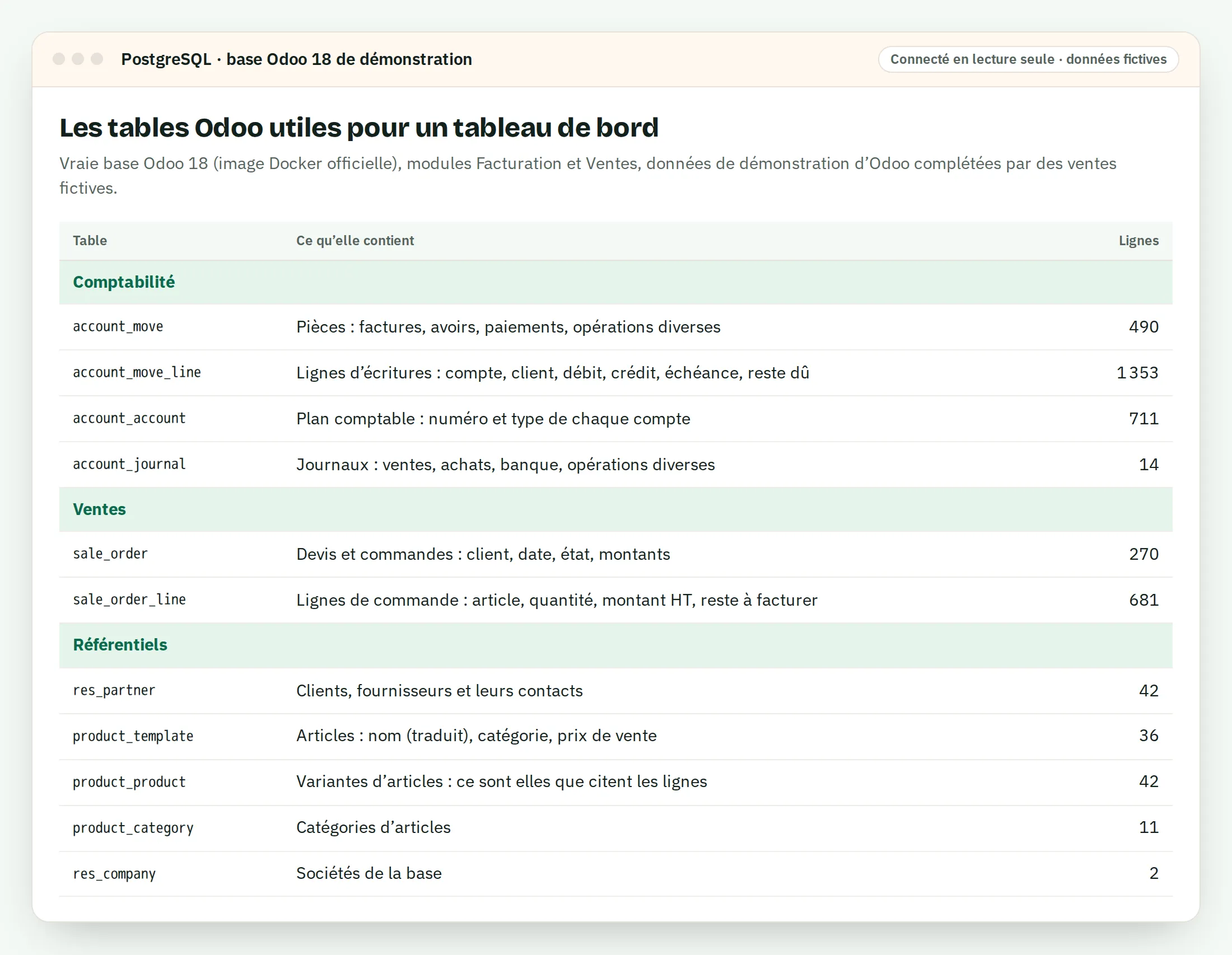
Real Odoo 18 database set up by KAVDAL in Docker: Odoo demo data and fictional sales.
The fields that matter, checked on our database:
| Table | Field | What to know |
|---|---|---|
| account_move | move_type |
out_invoice = customer invoice, out_refund = customer credit note, in_invoice and in_refund for suppliers, entry for other entries |
| account_move | state |
draft, posted (validated), cancel |
| account_move | amount_untaxed_signed, amount_residual_signed |
Amount excl. VAT and amount due, in company currency, negative for a credit note; amount_untaxed is always positive |
| account_move | invoice_date, invoice_date_due |
Invoice date and due date |
| account_move_line | balance, date_maturity, amount_residual |
Debit minus credit, the line’s due date, what remains to be paid |
| account_move_line | parent_state, reconciled |
The entry’s state, and true once the line is settled (matched) |
| account_account | account_type |
asset_receivable = customers, income = sales, liability_payable = suppliers |
| sale_order | state, invoice_status |
draft and sent = quotations, sale = order, cancel; to invoice = still to invoice |
| sale_order_line | price_subtotal, untaxed_amount_to_invoice |
Line amount excl. VAT and what remains to be invoiced |
| res_partner | commercial_partner_id |
The company a contact belongs to |
Three ready-to-copy queries
They run as-is on our Odoo 18 and Odoo 20 databases (PostgreSQL 16), and only use fields that also exist in Odoo 17. In our database the company has ID 2: in yours, SELECT id, name FROM res_company; gives the right one. Before you rely on the results, check them with your accountant.
Monthly revenue
-- Monthly revenue excl. VAT, from validated customer invoices
SELECT date_trunc('month', invoice_date)::date AS mois,
       SUM(amount_untaxed_signed) AS ca_ht         -- negative for a credit note
FROM account_move
WHERE state = 'posted'                             -- validated: no drafts, no cancelled
  AND move_type IN ('out_invoice', 'out_refund')   -- customer invoices and credit notes
  AND company_id = 2                               -- your company (res_company table)
GROUP BY 1
ORDER BY 1;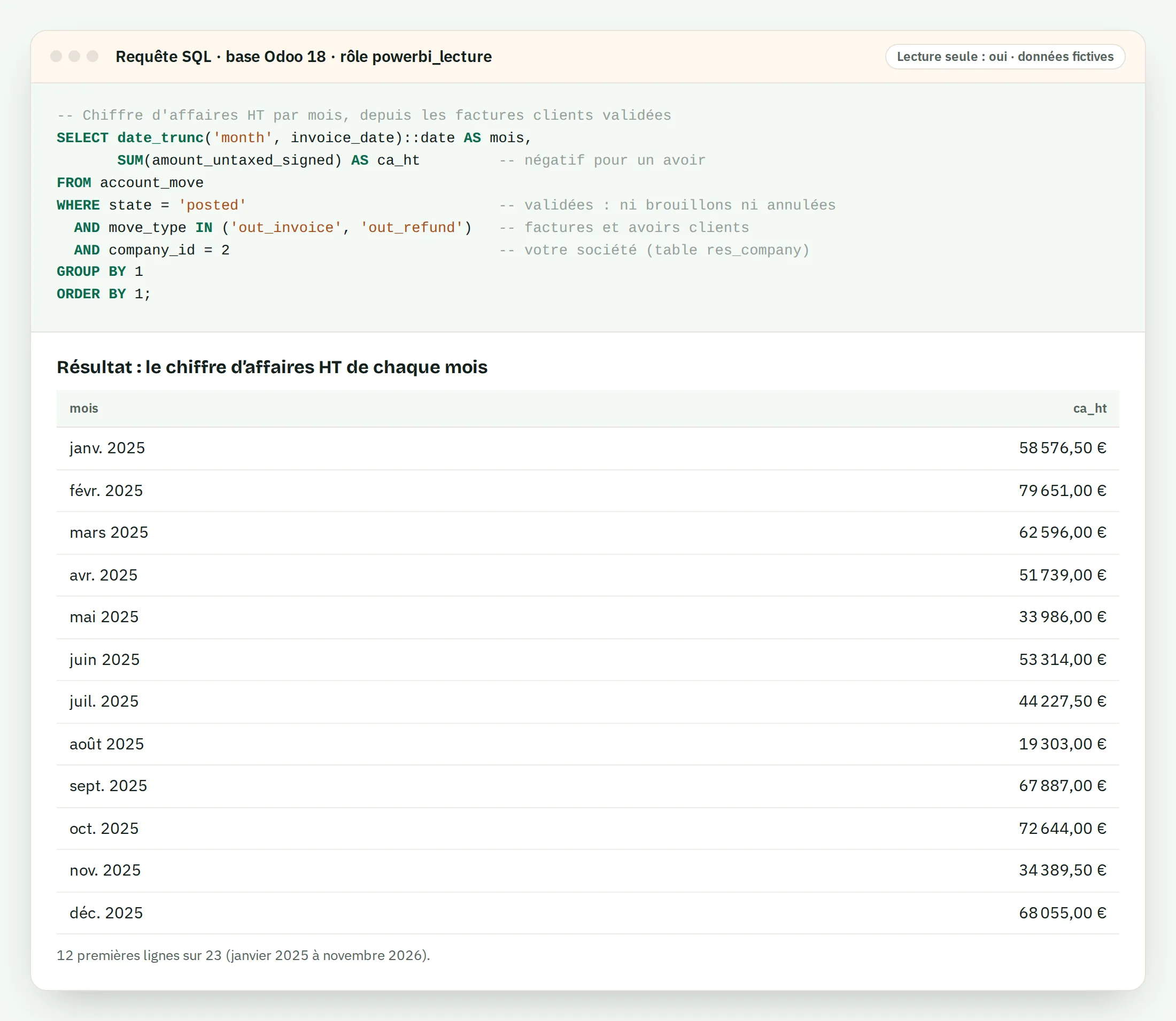
Result on our Odoo 18 database, with the read-only role: fictional data.
Use closed months. The current month is always incomplete: in our database, 6 confirmed orders were not invoiced yet, one of them with its invoice still in draft.
This figure comes from invoices. The accounting figure (revenue accounts) can differ if someone posts a manual entry to a revenue account. In our database, a miscellaneous entry from Odoo’s demo data creates a €2,500 gap in October 2026.
Overdue customer invoices
-- Unpaid customer invoices, by days overdue (as of today)
SELECT p.name AS client,
       COALESCE(SUM(l.amount_residual) FILTER (WHERE l.date_maturity >= CURRENT_DATE), 0) AS non_echu,
       COALESCE(SUM(l.amount_residual) FILTER (WHERE CURRENT_DATE - l.date_maturity BETWEEN 1 AND 30), 0) AS retard_1_30_j,
       COALESCE(SUM(l.amount_residual) FILTER (WHERE CURRENT_DATE - l.date_maturity BETWEEN 31 AND 60), 0) AS retard_31_60_j,
       COALESCE(SUM(l.amount_residual) FILTER (WHERE CURRENT_DATE - l.date_maturity > 60), 0) AS retard_plus_60_j
FROM account_move_line AS l
JOIN account_account AS a ON a.id = l.account_id
JOIN res_partner AS p ON p.id = l.partner_id
WHERE a.account_type = 'asset_receivable'          -- customer accounts
  AND l.parent_state = 'posted'
  AND NOT l.reconciled                             -- not yet settled by a payment
  AND l.company_id = 2
GROUP BY p.name
ORDER BY SUM(l.amount_residual) FILTER (WHERE l.date_maturity < CURRENT_DATE) DESC NULLS LAST;
We start from the customer lines of journal entries, not from invoices, for two reasons. An invoice paid in instalments has one due date per line. And a line’s amount due accounts for partial payments. In our database, this query’s total (€97,637) matches the sum of the amounts due on invoices and credit notes exactly.
Top customers over the last 12 months
-- Top 10 customers over the last 12 months, and their share of revenue
SELECT p.name AS client,
       SUM(m.amount_untaxed_signed) AS ca_ht_12_mois,
       ROUND(100 * SUM(m.amount_untaxed_signed) / SUM(SUM(m.amount_untaxed_signed)) OVER (), 1) AS part_pct
FROM account_move AS m
JOIN res_partner AS p ON p.id = m.commercial_partner_id
WHERE m.state = 'posted'
  AND m.move_type IN ('out_invoice', 'out_refund')
  AND m.invoice_date >= CURRENT_DATE - INTERVAL '12 months'
  AND m.company_id = 2
GROUP BY p.name
ORDER BY ca_ht_12_mois DESC
LIMIT 10;
commercial_partner_id groups invoices sent to the different contacts of one customer under the company name.
Your numbers up to date every morning, combined from your software: a first dashboard from €1,500.VAT not applicable, art. 293 B of the French Tax Code.
The resulting dashboard
With these three queries and a fourth on orders (the amount still to invoice in sale_order_line), accounting and sales sit on a single page. Odoo has that advantage: both live in the same database.
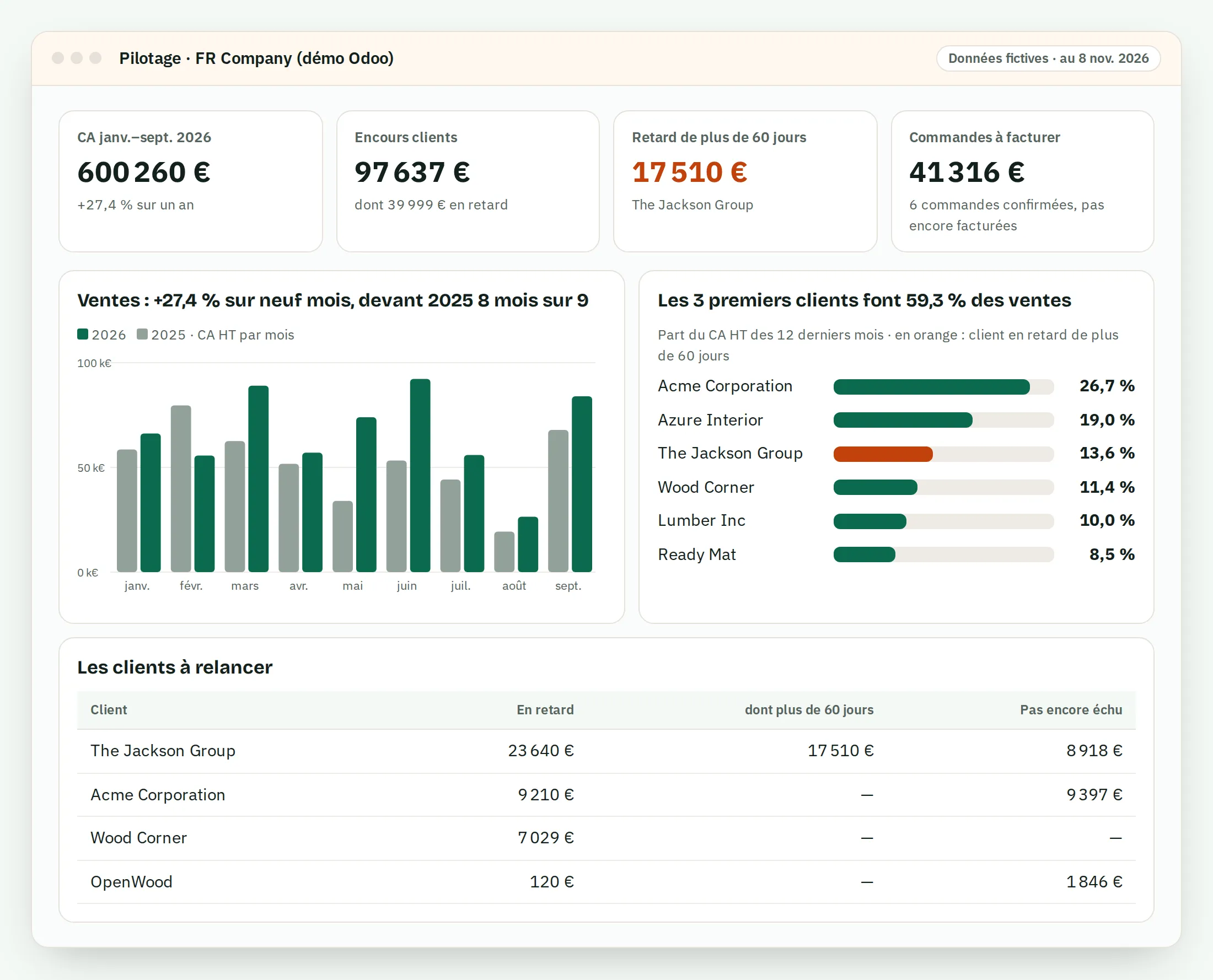
Sample dashboard built by KAVDAL on our Odoo 18 database: fictional data.
In this fictional example, sales are up 27.4% over nine months, and three customers make 59.3% of revenue. The third, The Jackson Group, has stopped paying since the summer: €23,640 overdue, €17,510 of it by more than 60 days. A customer worth 13.6% of sales who stops paying is the signal to see on Monday morning, before shipping their next order.
What about Odoo Online?
Without database access, Odoo’s API is what remains. Since Odoo 19, its main endpoint is called JSON-2: you send an HTTP request with an API key, and Odoo returns the data as JSON. We tested it on our Odoo 20: reading customer invoices works with a simple key. Four things to know before you start:
- The Custom plan. Odoo reserves the external API for this plan. On its French pricing page accessed on 8 November 2026, it is shown at €44.90 per user per month billed yearly (€35.90 for 12 months with the discount on the initial order), against €24.90 (€19.90 discounted) for the Standard plan.
- Keys to renew. According to Odoo’s documentation, a key cannot last more than three months: you will need to change it in Power BI at least once a quarter. And a key carries all the rights of the user who created it, write access included: set up a dedicated user with limited rights.
- Development work. Power BI has no Odoo connector. API calls are written in Power Query, table by table, without SQL: no ready-made joins, and volumes to split into pages.
- The old API is going away. The XML-RPC and JSON-RPC endpoints, the ones most tutorials use, have been deprecated since Odoo 19. Their removal is scheduled for Odoo Online 21.1 (winter 2027) and Odoo 22 (fall 2028). Odoo 20 already writes a warning to its log when they are called.
If your needs are simple, Excel exports of Odoo’s lists, reworked in Power BI, may be enough to start with. They do not refresh on their own.
Refreshing the numbers automatically
Power BI Desktop is enough to build the dashboard. To publish it and keep it up to date without thinking about it, you need two things.
An on-premises data gateway, if Odoo runs on your servers. The Power BI service, online, cannot reach a database in your network on its own. The gateway is free Windows software that makes the link without opening any inbound port. It has included the PostgreSQL provider since June 2025. Microsoft says not to install it on a domain controller, nor on a computer that sleeps, such as a laptop. For a database Power BI can reach directly over the internet, as on dedicated Odoo.sh, Microsoft says no gateway is needed. Test it on your database: if the connection fails, the gateway remains the fallback.
A licence to share. Power BI Desktop is free. To publish and share a report, each person who views it needs a Pro licence, at €12.10 excl. VAT per user per month paid yearly according to Microsoft’s French pricing page, accessed on 8 November 2026. A Pro licence allows up to 8 scheduled refreshes a day. We cover these settings in our guide Connect Sage 100 to Power BI.
Traps that distort the numbers
- Drafts and cancellations. Always filter
state = 'posted'on invoices andstate = 'sale'on orders: a quotation is not a sale. - The sign of credit notes.
amount_untaxedis positive even for a credit note. Use the_signedcolumns, in company currency and negative for credit notes. - Translated names. The name of a product, an account or a journal is stored as JSON, in every language:
{"en_US": "Office Chair", "fr_FR": "Chaise de bureau"}in our database. Read it withname->>'en_US'(or your language), with a fallback when a translation is missing. Customer names (res_partner) are plain text. - Account numbers since Odoo 18. Version 17’s
codecolumn is gone: the number is stored per company, as JSON, incode_store({"2": "411100"}in our database). Filter onaccount_typeinstead, which does not change between versions. - Unmatched credit notes. A credit note not matched with its invoice leaves both open. In Odoo 20’s demo data, one customer shows €31,750 not yet due and −€31,750 “overdue” as a result. Ask your accountant to match credit notes.
- “Paid” does not mean cashed. With the Invoicing app alone, an invoice turns “paid” as soon as the payment is recorded. For actual cash receipts, start from the bank reconciliation.
- Several companies. One Odoo database can hold several: always filter on
company_id. - Odoo upgrades. Every major version renames a few fields. On Odoo Online, upgrading is even mandatory, a few weeks after each new minor version, which comes out about every two months. After each migration, rerun your queries and check the read-only role still reads its tables.
Would you rather we did it?
Connecting Odoo is the technical part. The real work is choosing the few numbers you act on, and checking they match your accounts to the cent. KAVDAL builds these dashboards for small and mid-sized businesses: a first dashboard from €1,500, net price (VAT not applicable, art. 293 B of the French Tax Code), read-only on your Odoo database, and you own the result. Using Sage 100 or EBP rather than Odoo? Our Sage 100 and EBP guides follow the same method. Our sample dashboards are open without a form. We work remotely across France, and can also meet you in Toulouse or Lyon.
Sources
- Odoo.sh, FAQ “Can I remotely connect to an Odoo.sh postgresql database?”: read-only external PostgreSQL access for BI tools, dedicated hosting only, SSL mandatory, Power BI tested; on shared hosting, integrate at the HTTP layer — accessed 8 Nov 2026
- Odoo documentation 19.0, “Odoo Online”: backup download from the database manager; Odoo Apps Store modules incompatible with Odoo Online — accessed 8 Nov 2026
- Odoo documentation 19.0, “System configuration” (on-premise): PostgreSQL only accepts local connections by default; listen_addresses and pg_hba.conf — accessed 8 Nov 2026
- Odoo documentation 19.0, “ORM API”: “Executing raw SQL bypasses the ORM and, by consequent, Odoo security rules” — accessed 8 Nov 2026
- Odoo documentation 19.0, “External JSON-2 API”: /json/2 endpoint, API key in a bearer header, keys limited to three months, API only on Custom plans — accessed 8 Nov 2026
- Odoo documentation 20.0, “External RPC API”: XML-RPC and JSON-RPC deprecated, removal scheduled in Odoo 22 (fall 2028) and Odoo Online 21.1 (winter 2027) — accessed 8 Nov 2026
- Odoo, French “Pricing” page: One App Free, Standard and Custom plans; “External API” in the Custom plan only; discount applied for 12 months to the initial order — accessed 8 Nov 2026
- Odoo documentation 19.0, “Supported versions”: on Odoo Online, upgrading is mandatory a few weeks after each minor version (about every two months) — accessed 8 Nov 2026
- Odoo documentation 19.0, “Export and import data”: list exports to .csv or .xls, time-outs possible on large exports — accessed 8 Nov 2026
- Odoo source code 18.0 (GitHub), account_account.py: account number stored per company (code_store) since version 18, instead of the version 17 code column — accessed 8 Nov 2026
- Odoo source code 18.0 (GitHub), service/db.py: “GRANT CREATE ON SCHEMA PUBLIC TO PUBLIC” when a database is created (“restore legacy behaviour on pg15+”) — accessed 8 Nov 2026
- Docker Hub, official “odoo” image (18.0 and 20.0 builds of 2 November 2026), used for our tests — accessed 8 Nov 2026
- Microsoft Learn, Power Query “PostgreSQL database” connector: Npgsql provider included in Power BI Desktop since December 2019 and in the gateway since June 2025, Import and DirectQuery modes, SQL statement, encryption — accessed 8 Nov 2026
- Microsoft Learn, list of Power Query connectors (updated 14 Oct 2026): no Odoo connector — accessed 8 Nov 2026
- Microsoft Learn, “Data refresh in Power BI”: a gateway is required when Power BI cannot reach the source over a direct network connection — accessed 8 Nov 2026
- Microsoft Learn, “Install an on-premises data gateway”: Windows, not on a domain controller or a computer that sleeps — accessed 8 Nov 2026
- Microsoft Learn, “Configure scheduled refresh”: up to 8 refreshes a day with Pro — accessed 8 Nov 2026
- Microsoft, “Power BI pricing” page (France): Power BI Desktop free; Pro €12.10 excl. VAT per user per month, paid yearly — accessed 8 Nov 2026
- PostgreSQL 16 documentation, “Schemas”: CREATE privilege on the public schema and the secure schema usage pattern — accessed 8 Nov 2026
Your numbers up to date every morning, combined from your software: a first dashboard from €1,500.VAT not applicable, art. 293 B of the French Tax Code.