Connect EBP (France) to Power BI: a step-by-step guide
Connect Power BI to EBP: the “EBP” SQL Server instance, separate accounting and sales databases, a read-only login, the useful tables and three tested queries.
Yes, Power BI connects directly to EBP, the French accounting and sales software, on one condition: your EBP software must be installed on your own computer or server, not used online. Installed EBP products (ACTIV, PRO and ELITE ranges) store their data in Microsoft SQL Server, under an instance named EBP, which the free Power BI Desktop reads with its built-in connector. One EBP specificity: accounting and sales management live in two separate databases.
This guide follows the setup order. The queries and screenshots come from two sample databases we built in SQL Server: they use EBP’s table and column names, with a made-up company and made-up figures. The screenshots are in French, like EBP itself.
Is your EBP installed or online?
This is the first question, because it decides everything.
- Installed EBP (perpetual licence or local subscription): installation puts the software and the SQL Server 2017 engine on the server. It is the free Express edition for 2 to 4 users; EBP requires a Standard edition from 5 users or a 10 GB database. EBP currently validates SQL Server up to version 2022. Power BI can read these databases.
- Online EBP: the same applications, hosted by EBP and used remotely. EBP says you cannot make a local backup of online data. So there is no database to connect to. Exports remain, plus an API for sales management (see below).
- EBP Hubbix: the range has been discontinued; access has been blocked since 1 September 2026.
Where your EBP data lives
- The server: the machine name followed by
\EBP, for exampleSALES-SRV\EBP. That is the name EBP’s wizard suggests when creating a company file, and the Windows service is called “SQL Server (EBP)”. - One database per company file: each EBP file is a SQL database. The database name contains the file name; you will spot it in Power BI’s Navigator.
- Two files, so two databases: sales management sends its entries to a separate accounting file through a transfer file. EBP even recommends two backups, one per file.
- All financial years in the same database: a new year is created inside the file, with at most two open years.
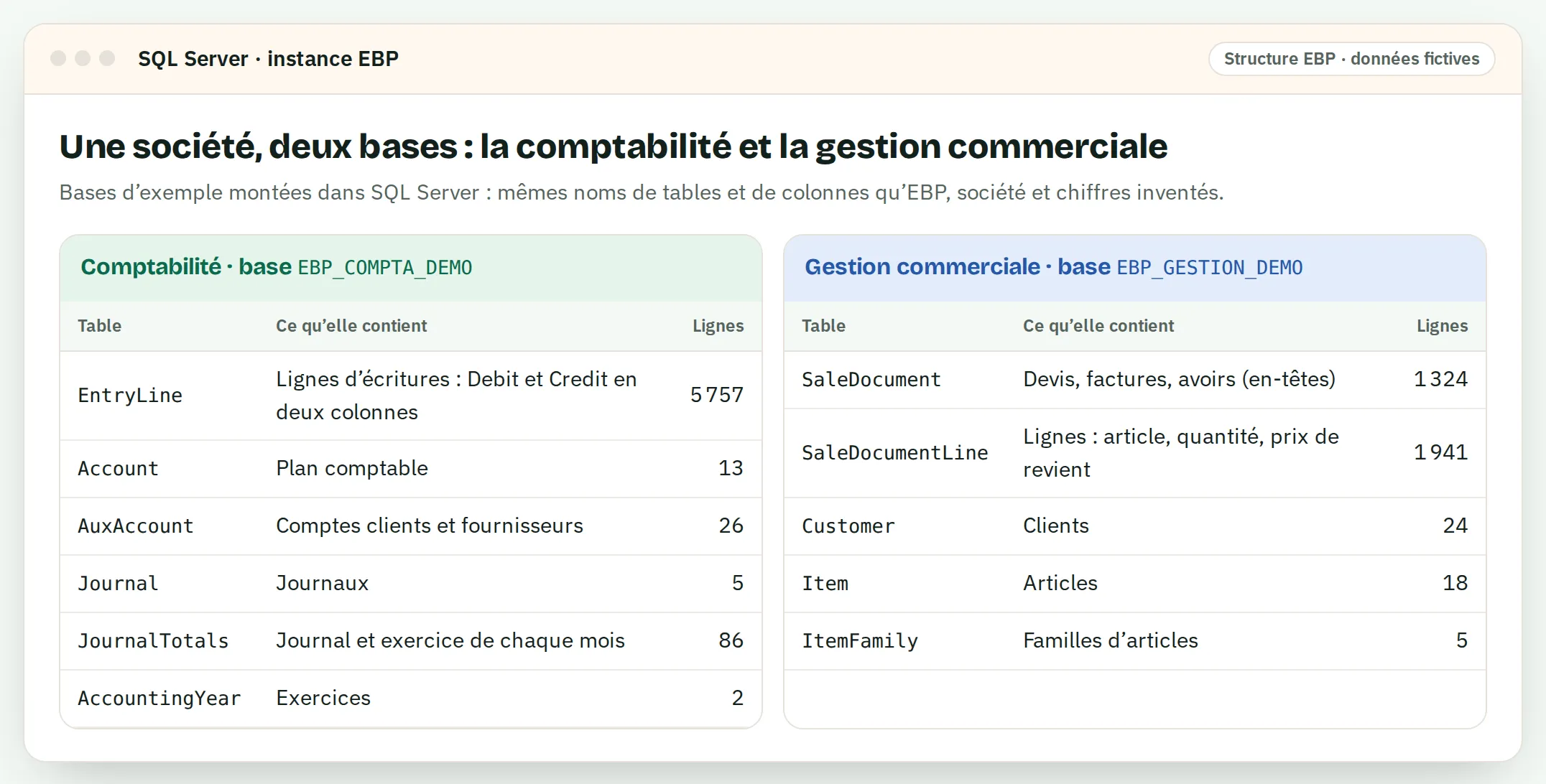
Sample databases built by KAVDAL in SQL Server: EBP structure, fictional data.
Four ways to link Power BI and EBP
| Method | For whom | Limits |
|---|---|---|
| Power BI SQL Server connector (recommended) | Installed EBP | A read-only login to create, two databases to link, a gateway for online refresh |
| EBP reporting partners (Inside Reporting, MyReport) | Installed EBP, with an EBP PRIVILEGE or PREMIUM service plan | Prices not published; reporting tools, not Power BI itself |
| EBP REST API | Online sales and construction applications | No accounting; manual sign-in, 1 call per second; support contract required: you need an intermediate program |
| Exports (FEC, custom export) | Everyone, online included | Manual; the FEC only holds accounting |
We found no official EBP Power BI connector and no EBP-specific ODBC driver: on an installed EBP, Power BI’s native SQL Server connector is enough.
Step by step: connect Power BI to the EBP databases
1. Create a read-only login, and forget the “sa” account
This is the most important point of this guide. During installation, EBP switches the instance to mixed authentication and enables the sa administrator account with a default password that is the same for every customer and published in EBP’s online help. One online tutorial even connects Power BI with that account. Don’t: it can change anything, and everyone knows its password.
EBP “strongly” discourages writing to the database by any other means than its software. Reading is not covered by any public EBP text: talk to your reseller, and only read with a login that cannot change anything. Your administrator runs this once, on both databases:
-- On SQL Server's EBP instance (already in mixed authentication)
CREATE LOGIN powerbi_read WITH PASSWORD = 'a long, unique password';

USE [ACCOUNTING_DATABASE_NAME];   -- the accounting file's database
CREATE USER powerbi_read FOR LOGIN powerbi_read;
ALTER ROLE db_datareader ADD MEMBER powerbi_read;

USE [SALES_DATABASE_NAME];        -- the sales management file's database
CREATE USER powerbi_read FOR LOGIN powerbi_read;
ALTER ROLE db_datareader ADD MEMBER powerbi_read;
We tested this script on our two sample databases: the login reads both and SQL Server refuses any deletion. While you are at it, ask your reseller to change the default sa password, checking with them the effect on EBP.
2. Connect Power BI Desktop
In the free Power BI Desktop: Get data, then SQL Server database.
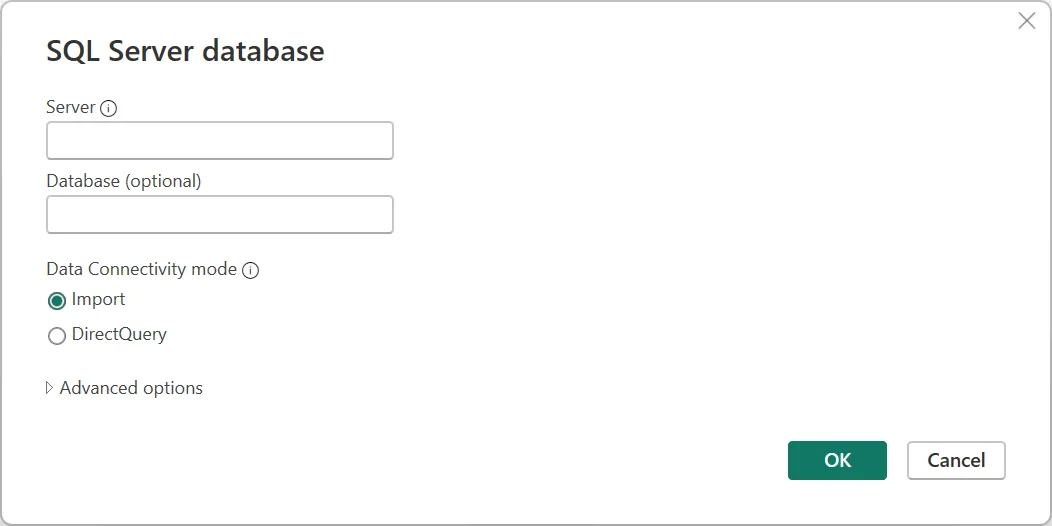
Screenshot: Microsoft, Power BI documentation (learn.microsoft.com), licensed CC BY 4.0, unmodified.
- Server:
SALES-SRV\EBP(your machine name followed by\EBP). - Database: leave it empty, then pick the database in the Navigator. Make one connection for accounting and another for sales management.
- Mode: Import, so the live database is not queried at every click.
If the connection fails from another computer, EBP describes the settings: TCP/IP protocol enabled under “Protocols for EBP”, SQL Server Browser service running, and firewall rules.
The EBP tables you need
Good news: EBP’s table names are in English and self-explanatory. EBP even provides the exact list for your version: in the software, Tools, then Export the application schema. Keep it at hand.
| Database | Table | Useful fields |
|---|---|---|
| Accounting | EntryLine (entry lines) |
EntryLineDate, GeneralAccountNumber, AuxiliaryAccountNumber, Debit and Credit (two columns), CommitmentDate (due date), ApplyingCode (matching), Simulated, IsOpening (opening balance) |
| Accounting | JournalTotals, Journal, AccountingYear |
Each month’s journal and financial year |
| Accounting | Account, AuxAccount |
General ledger accounts; customer and supplier accounts |
| Sales | SaleDocument |
DocumentType, DocumentNumber, DocumentDate, CustomerId, ValidationState (0 = draft) |
| Sales | SaleDocumentLine |
LineType (2 = goods, 3 = service, 4 = text, 5 = subtotal), Quantity, CostPrice (unit cost), RealNetAmountVatExcludedWithDiscount (net amount excl. VAT) |
| Sales | Item, ItemFamily, Customer |
Items, item families, customers |
Check the document codes first
In SaleDocument, the DocumentType column tells whether a document is a quote, an invoice or a credit note. EBP’s official API documentation gives 1 = quote, 2 = invoice, 3 = credit note, 4 and 5 for deposits, 6 = delivery note, 8 = order. But no EBP text states explicitly that the database stores these values, and EBP’s online API uses a different numbering (credit note = 9). A two-minute query settles it on your database:
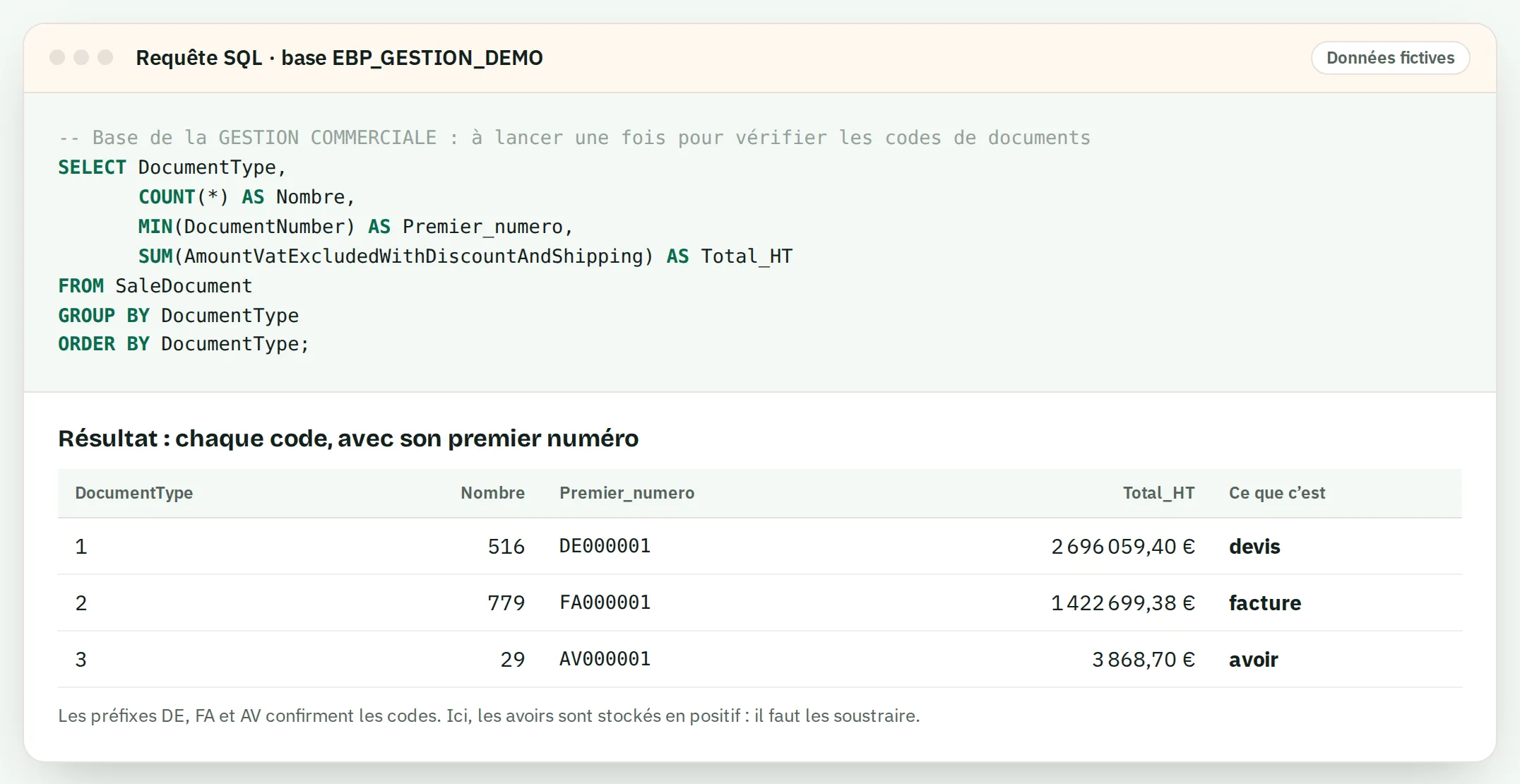
Result on the sample database, fictional data.
The number prefixes (DE, FA, AV) confirm the codes. The credit notes’ total also tells you how they are stored: positive in our example, so they must be subtracted.
Your numbers up to date every morning, combined from your software: a first dashboard from €1,500.VAT not applicable, art. 293 B of the French Tax Code.
Three ready-to-copy queries
They run as-is on our sample databases (SQL Server 2022). On your own databases, check the results with your accountant before you rely on them.
Monthly revenue (accounting database)
SELECT DATEFROMPARTS(YEAR(EntryLineDate), MONTH(EntryLineDate), 1) AS Mois,
       SUM(Credit - Debit) AS CA_HT
FROM EntryLine
WHERE GeneralAccountNumber LIKE '70%'
  AND Simulated = 0      -- without simulated entries
  AND IsOpening = 0      -- without opening balances
GROUP BY DATEFROMPARTS(YEAR(EntryLineDate), MONTH(EntryLineDate), 1)
ORDER BY Mois;
Debit and credit are two columns: for revenue, take credit minus debit, so a credit note posted as a debit is deducted.
Gross margin by item family (sales database)
SELECT f.Caption AS Famille,
       SUM(s.Signe * l.RealNetAmountVatExcludedWithDiscount) AS CA_HT,
       SUM(s.Signe * (l.RealNetAmountVatExcludedWithDiscount - l.CostPrice * l.Quantity)) AS Marge_HT
FROM SaleDocumentLine AS l
JOIN SaleDocument AS d ON d.Id = l.DocumentId
CROSS APPLY (SELECT CASE d.DocumentType WHEN 3 THEN -1 ELSE 1 END AS Signe) AS s  -- credit notes stored as positive: see the control query
JOIN Item AS i ON i.Id = l.ItemId
JOIN ItemFamily AS f ON f.Id = i.FamilyId
WHERE d.DocumentType IN (2, 3)     -- invoices and credit notes
  AND d.ValidationState <> 0       -- without drafts
  AND l.LineType IN (2, 3)         -- goods and services: no text, no subtotal
GROUP BY f.Caption
ORDER BY Marge_HT DESC;
If your control query shows credit notes already stored as negative, replace -1 with 1. And if you sell assembled items (bills of materials), exclude component lines with the NomenclatureLevel column, or they count twice.
Overdue customer invoices (accounting database)
DECLARE @Au date = CAST(GETDATE() AS date);
SELECT a.FullName AS Client,
       SUM(CASE WHEN e.CommitmentDate >= @Au THEN e.Debit - e.Credit ELSE 0 END) AS Non_echu,
       SUM(CASE WHEN DATEDIFF(day, e.CommitmentDate, @Au) BETWEEN 1 AND 30 THEN e.Debit - e.Credit ELSE 0 END) AS Retard_1_30_j,
       SUM(CASE WHEN DATEDIFF(day, e.CommitmentDate, @Au) BETWEEN 31 AND 60 THEN e.Debit - e.Credit ELSE 0 END) AS Retard_31_60_j,
       SUM(CASE WHEN DATEDIFF(day, e.CommitmentDate, @Au) > 60 THEN e.Debit - e.Credit ELSE 0 END) AS Retard_plus_60_j
FROM EntryLine AS e
JOIN AuxAccount AS a ON a.AccountNumber = e.AuxiliaryAccountNumber
WHERE e.GeneralAccountNumber LIKE '411%'
  AND ISNULL(e.ApplyingCode, '') = ''   -- unmatched
  AND e.Simulated = 0 AND e.IsOpening = 0
GROUP BY a.FullName
ORDER BY SUM(CASE WHEN e.CommitmentDate < @Au THEN e.Debit - e.Credit ELSE 0 END) DESC;
A customer line without a matching code has not been matched with a payment. If you match partially, EBP records it in a separate column: compare the result with EBP’s schedule for a few customers, or start from the due-date table (Commitment).
The resulting dashboard
With these queries and the bank account balance, accounting and sales end up on one page, even though they live in two databases.
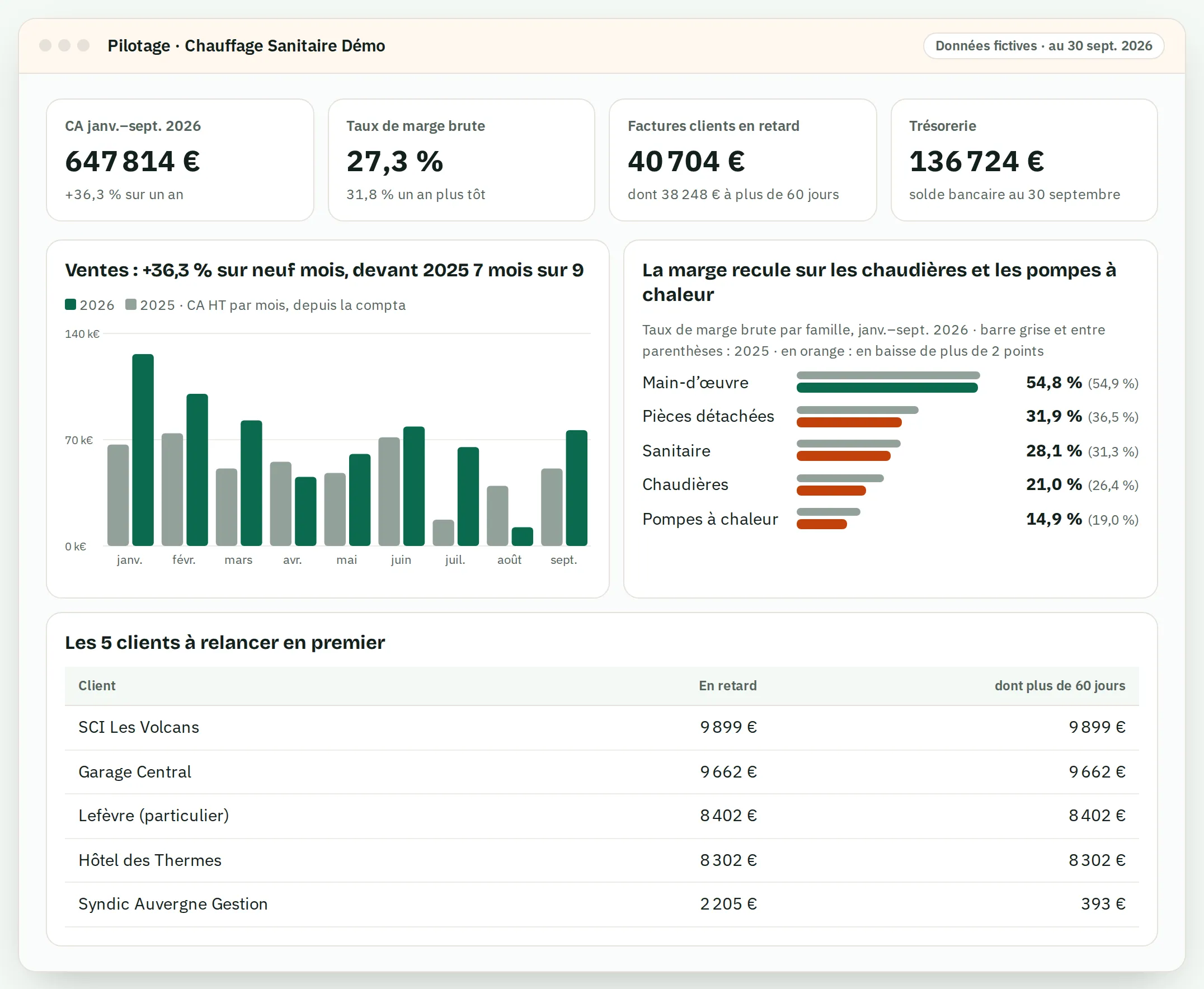
Sample dashboard built by KAVDAL on the sample databases: fictional data.
In this example, sales are clearly up, but the margin rate falls from 31.8% to 27.3%: heat pumps go from 19.0% to 14.9% margin, because their purchase prices rise faster than selling prices. And almost all of the overdue amount is more than 60 days late: that is a chasing list, not a simple payment delay.
Refreshing the numbers automatically
As with Sage 100, you need an on-premises data gateway, free Windows software installed on a computer on the network that is always on, and a Power BI Pro licence for each person who views the report: €12.10 excl. VAT per user per month paid yearly, according to Microsoft’s French pricing page accessed on 28 October 2026. Both points are detailed in our guide Connect Sage 100 to Power BI. EBP states that its SQL engine cannot be installed on a NAS: the gateway does not belong there either.
Traps that distort the numbers
- Two databases. Accounting and sales only meet at the accounting transfer. Link them by invoice number, after checking it is carried over into the entries.
- Opening balances. Lines with
IsOpening = 1copy the previous year’s balances: exclude them as soon as you add up several years. - Simulated and unvalidated entries. Decide whether your dashboard shows them, and filter on
Simulated. - Draft documents.
ValidationState = 0: a draft invoice is not revenue. - Lines that are not sales. Text, subtotals, headings and bill-of-materials components: filter on
LineTypeandNomenclatureLevel. - EBP updates. A new version updates the company file and may add columns, as with Open Line Plus (version 25). Re-export the schema and retest your queries after each major version.
- Several companies. One database per company and per application: in Power BI, append the queries with a “Company” column.
- The Express limit. 10 GB per database: beyond that, EBP requires SQL Server Standard.
Would you rather we did it?
Connecting EBP is the technical part. The real work is choosing the few numbers you act on, linking accounting and sales cleanly, and checking everything matches to the cent. KAVDAL builds these dashboards for small and mid-sized businesses: a first dashboard from €1,500, net price (VAT not applicable, art. 293 B of the French Tax Code), read-only on your EBP databases, and you own the result. You can also browse our sample dashboards, open without a form. We work remotely across France, and on site in Toulouse and Lyon.
Sources
- EBP, “Installer les solutions EBP” (help centre, edited 29/09/2026): SQL Server 2017 engine installed with the software, sa account enabled with a default password, server name followed by \EBP — accessed 28 Oct 2026
- EBP, “Installation du moteur Microsoft SQL Express” (help centre, edited 27/10/2026): named instance EBP, mixed authentication, SQL Server Browser — accessed 28 Oct 2026
- EBP, “Compatibilité Windows Moteur SQL” (help centre, edited 30/09/2026): solutions validated up to SQL Server 2022 — accessed 28 Oct 2026
- EBP, “Configurations conseillées de votre logiciel” (ebp.com, modified 03/09/2026): SQL Server 2017 Express for 2 to 4 users, Standard from 5 users or a 10 GB database — accessed 28 Oct 2026
- EBP, “Transférer les écritures comptables vers la Comptabilité EBP” (help centre, edited 12/02/2026): separate sales and accounting company files — accessed 28 Oct 2026
- EBP, SDK technical documentation (2021): writing to the database by any other means than the application is “strongly discouraged”; export of the application schema — accessed 28 Oct 2026
- EBP, “API pour EBP Gestion Commerciale Open Line” (official reference): SaleDocument table, SaleDocumentSubTypes, DocumentValidationState and DocumentLineType enumerations — accessed 28 Oct 2026
- EBP, “API Rest : qu’est-ce que le Portail développeur EBP ?” (help centre, edited 30/09/2026): API limited to the online sales and construction applications — accessed 28 Oct 2026
- EBP, SaaS FAQ (help centre, edited 29/09/2026): no local backup of online data — accessed 28 Oct 2026
- EBP, “Arrêt des solutions Hubbix” (help centre, created 28/08/2026): access blocked from 1 September 2026 — accessed 28 Oct 2026
- webEBP.fr (integrator), EBP accounting and sales database table structures (September 2025): exports of the EBP application schema — accessed 28 Oct 2026
- Microsoft Learn, Power Query “SQL Server database” connector and the db_datareader role — accessed 28 Oct 2026
- Microsoft, “Power BI pricing” page (France): Power BI Desktop free; Pro €12.10 excl. VAT per user per month, paid yearly — accessed 28 Oct 2026
Your numbers up to date every morning, combined from your software: a first dashboard from €1,500.VAT not applicable, art. 293 B of the French Tax Code.