Connect Sage 100 (France) to Power BI: a step-by-step guide
Connect Power BI to the French Sage 100: the SQL Server database, a read-only login, the useful tables, three ready-to-copy queries and automatic refresh.
Yes, Power BI connects directly to Sage 100. This guide is about the French Sage 100 (Sage 100 Comptabilité and Gestion commerciale), not the US product of the same name, formerly MAS 90. Since version 100c (2018), all French Sage 100 data lives in a Microsoft SQL Server database, which the free Power BI Desktop reads with its built-in connector. You need four things (the server, the instance, the database name and a read-only login), about ten tables, and a gateway so the numbers refresh on their own.
The queries and screenshots come from a sample database we built in SQL Server: it uses Sage 100’s table and field names, with a made-up company and made-up figures. The screenshots are in French, like Sage 100 itself.
Is your Sage 100 on SQL Server?
Almost certainly. In Sage’s compatibility tables, from V3 (April 2018) to V12 (2026), SQL Server is the only database engine listed. A Sage employee wrote it again in April 2026: Sage 100 applications “require SQL Server”. The Essentials and Standard editions use the free SQL Server Express; Premium runs on a full SQL Server edition, which Sage no longer ships since V12.
Only very old “i7 Windows” versions kept their data in proprietary files. If that is your case, the connection below will not work: migrate to a recent version first.
To check, and to find the connection details:
- The version: in Sage, menu ?, then À propos (About). A 100c, 100cloud or Sage 100 V3+ version runs on SQL Server.
- The server and instance: open your company accounting file (extension .mae) in Notepad. On SQL versions it is not a data file but a small settings file: the
ServeurSQL=line gives the server and instance, for exampleACCOUNTS-SRV\SAGE100. Installing Essentials or Standard creates an instance named SAGE100. - The database name: it is the file name.
MYCOMPANY.maepoints to theMYCOMPANYdatabase.
Accounting and sales management for one company live in a single database. One more company means one more database.
Three ways to link Power BI and Sage 100
| Method | What you get | Limits |
|---|---|---|
| Power BI SQL Server connector (recommended) | Every table, accounting and sales, refreshed automatically | Needs a read-only SQL login and a gateway for online refresh |
| Sage BI Reporting (Sage’s Excel add-in) | Ready-made connectors for Sage 100, in Excel | It is not Power BI; Sage does not publish the price |
| Exports (FEC, Excel) | No database access, nothing to install | Accounting only for the FEC, and a manual export at every update |
What about Sage’s ODBC driver? It has not been sold since November 2022, has had no maintenance since 31 May 2023, and does not exist for V10, V11 or V12. On a SQL database, Power BI’s SQL Server connector replaces it.
Step by step: connect Power BI to the Sage 100 database
1. Create a read-only login
Never connect Power BI with an account that can change the database. Sage is very clear: modifying a closed entry or a posted invoice through SQL is “à proscrire” (to be avoided), because those records would be flagged as corrupted and the only fix would be restoring a backup. For reading, a Sage employee confirms you can use Microsoft’s SQL driver directly.
The simplest option is a login with only the db_datareader role, which can read every table and nothing else. Your administrator or Sage reseller runs this once:
-- On Sage's SQL Server instance, in mixed authentication mode
CREATE LOGIN powerbi_read WITH PASSWORD = 'a long, unique password';
USE MYCOMPANY;   -- your Sage 100 database name (the .mae file name)
CREATE USER powerbi_read FOR LOGIN powerbi_read;
ALTER ROLE db_datareader ADD MEMBER powerbi_read;
We tested this script on our sample database: the login reads all 7,886 entries and SQL Server refuses any change. One point to watch: Sage installs its instance with Windows authentication. A SQL login like this one requires switching the instance to mixed mode, which Sage describes in its technical recommendations. Otherwise, use a domain Windows account limited to reading.
2. Connect Power BI Desktop
In the free Power BI Desktop: Get data, then SQL Server database.
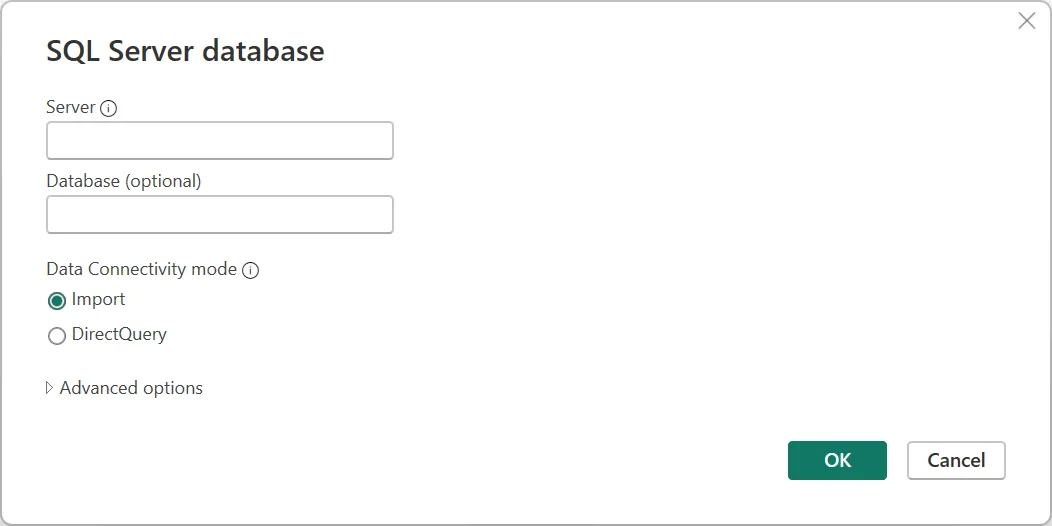
Screenshot: Microsoft, Power BI documentation (learn.microsoft.com), licensed CC BY 4.0, unmodified.
- Server: the
ServeurSQL=value, for exampleACCOUNTS-SRV\SAGE100. - Database: your company file name, for example
MYCOMPANY. - Mode: choose Import. Power BI copies the data at refresh time instead of querying the live database at every click, as DirectQuery would.
If the connection fails from another computer, network access to the named instance (ports and the SQL Browser service) is usually missing: that is a job for your administrator or reseller.
3. Pick the tables, or paste a query
The Navigator lists every table in the database. You can tick several, or better, paste a SQL query under Advanced options when connecting: Power BI then loads only the columns and rows you need.
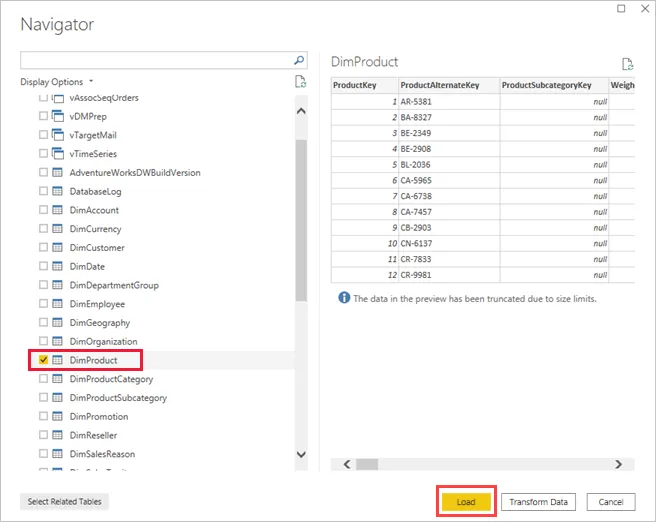
Screenshot: Microsoft, Power BI documentation (learn.microsoft.com), AdventureWorks sample database, licensed CC BY 4.0, unmodified.
The Sage 100 tables you need
A Sage 100 database holds hundreds of tables. A manager’s dashboard needs only a handful.
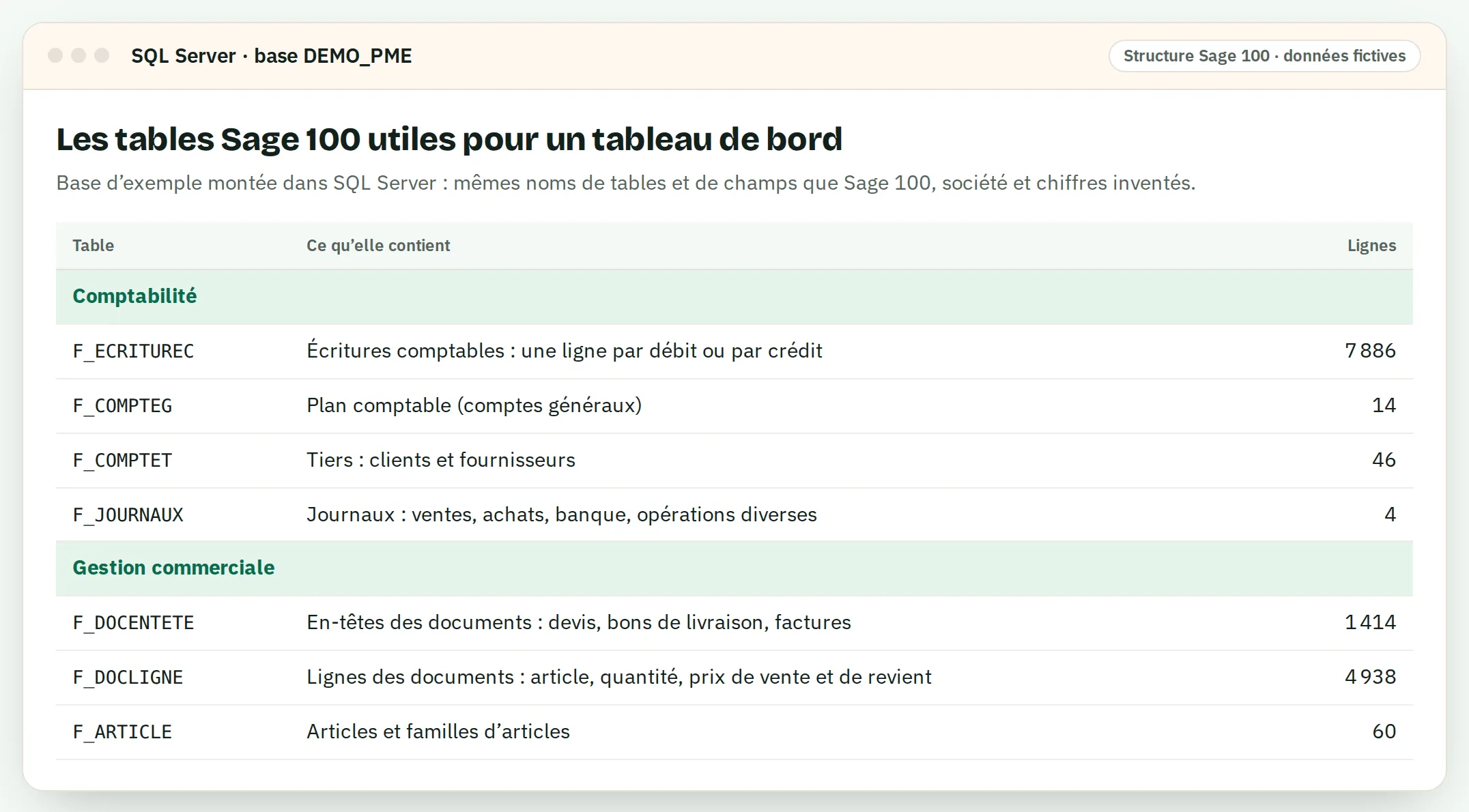
Sample database built by KAVDAL in SQL Server: Sage 100 structure, fictional data.
The fields that matter, according to Sage’s “Structure des bases Sage 100” V12.25:
| Table | Field | What to know |
|---|---|---|
| F_ECRITUREC | JM_Date, EC_Jour |
The period (always the 1st of the month) and the day: this is the accounting date |
| F_ECRITUREC | EC_Date |
The entry date, not the transaction date: do not use it for monthly figures |
| F_ECRITUREC | EC_Sens, EC_Montant |
0 = debit, 1 = credit; always read the amount with its direction |
| F_ECRITUREC | EC_Echeance, EC_Lettre |
The due date, and 0 = unmatched entry (so unpaid, for a customer) |
| F_COMPTET | CT_Type |
0 = customer, 1 = supplier, 2 = employee, 3 = other |
| F_DOCENTETE | DO_Domaine, DO_Type |
0 = sales; 6 = invoice, 7 = posted invoice |
| F_DOCENTETE | DO_Provenance |
1 = return invoice, 2 = credit note |
| F_DOCLIGNE | DL_MontantHT, DL_PrixRU, DL_CMUP |
Line amount excl. VAT, unit cost price, weighted average cost |
| F_ARTICLE | FA_CodeFamille |
The item family, to analyse margins |
Three ready-to-copy queries
They run as-is on our sample database (SQL Server 2022). On your own database, check the results with your accountant before you rely on them.
Monthly revenue
-- Monthly revenue excl. VAT, from accounting (accounts 70)
-- JM_Date = the period (1st of the month); EC_Date is the entry date
SELECT JM_Date AS Mois,
       SUM(CASE EC_Sens WHEN 1 THEN EC_Montant ELSE -EC_Montant END) AS CA_HT
FROM F_ECRITUREC
WHERE CG_Num LIKE '70%'
GROUP BY JM_Date
ORDER BY Mois;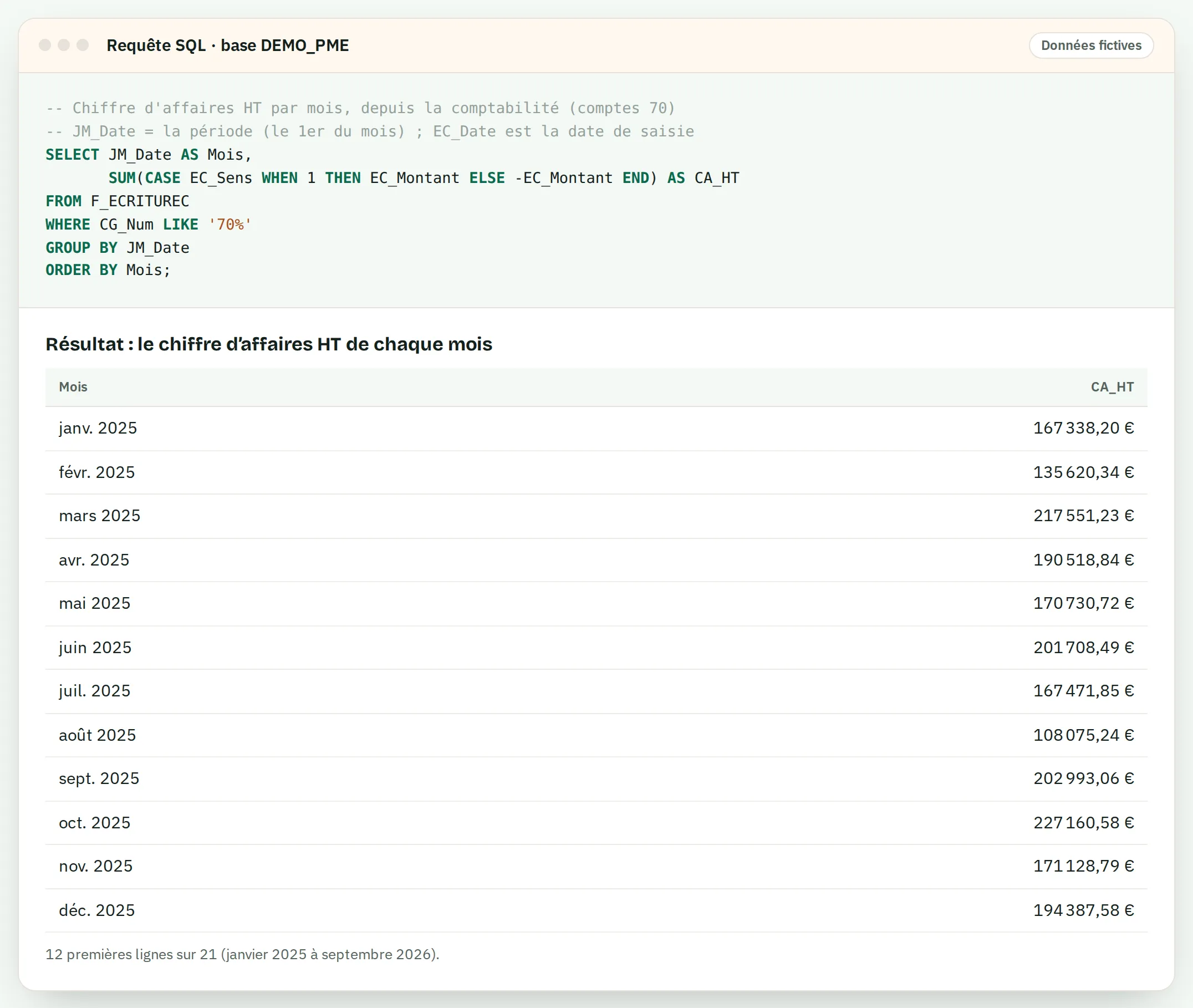
Result on the sample database, fictional data.
Revenue sits on the credit side, hence the sign: a credit note posted as a debit is correctly deducted. Do not replace this with an absolute value: depending on a company setting, Sage may store negative lines.
Gross margin by item family
-- Gross margin by item family, from sales management (sales invoices)
SELECT a.FA_CodeFamille AS Famille,
       SUM(l.DL_MontantHT) AS CA_HT,
       SUM(l.DL_MontantHT - l.DL_Qte * l.DL_PrixRU) AS Marge_HT,
       SUM(l.DL_MontantHT - l.DL_Qte * l.DL_PrixRU) / SUM(l.DL_MontantHT) AS Taux_marge
FROM F_DOCLIGNE AS l
JOIN F_ARTICLE AS a ON a.AR_Ref = l.AR_Ref
WHERE l.DO_Domaine = 0          -- sales
  AND l.DO_Type IN (6, 7)        -- invoices and posted invoices
  AND l.DL_Valorise = 1          -- without kit component lines
GROUP BY a.FA_CodeFamille
ORDER BY Marge_HT DESC;
Two choices to validate on your own file. The cost: DL_PrixRU (cost price) or DL_CMUP (weighted average cost), depending on how your stock is valued. And credit notes: they are invoices with DO_Provenance = 2, and the sign of their amounts should be checked on a few documents before adding them up.
Overdue customer invoices
-- Unpaid customer invoices, by days overdue
DECLARE @Au date = CAST(GETDATE() AS date);
SELECT t.CT_Intitule AS Client,
       SUM(CASE WHEN e.EC_Echeance >= @Au THEN e.EC_Montant ELSE 0 END) AS Non_echu,
       SUM(CASE WHEN DATEDIFF(day, e.EC_Echeance, @Au) BETWEEN 1 AND 30 THEN e.EC_Montant ELSE 0 END) AS Retard_1_30_j,
       SUM(CASE WHEN DATEDIFF(day, e.EC_Echeance, @Au) BETWEEN 31 AND 60 THEN e.EC_Montant ELSE 0 END) AS Retard_31_60_j,
       SUM(CASE WHEN DATEDIFF(day, e.EC_Echeance, @Au) > 60 THEN e.EC_Montant ELSE 0 END) AS Retard_plus_60_j
FROM F_ECRITUREC AS e
JOIN F_COMPTET AS t ON t.CT_Num = e.CT_Num
WHERE e.CG_Num LIKE '411%' AND e.EC_Sens = 0 AND e.EC_Lettre = 0
GROUP BY t.CT_Intitule
ORDER BY SUM(CASE WHEN e.EC_Echeance < @Au THEN e.EC_Montant ELSE 0 END) DESC;
An unmatched customer invoice is one that has not been matched with a payment. If you match partially (deposits, payments in instalments), compare the result with Sage’s aged balance for a few customers.
Your numbers up to date every morning, combined from your software: a first dashboard from €1,500.VAT not applicable, art. 293 B of the French Tax Code.
The resulting dashboard
With these three queries and the bank account balance, you get a page that answers the Monday-morning questions: how are sales doing, is the margin holding, who needs chasing, and how much cash is left.
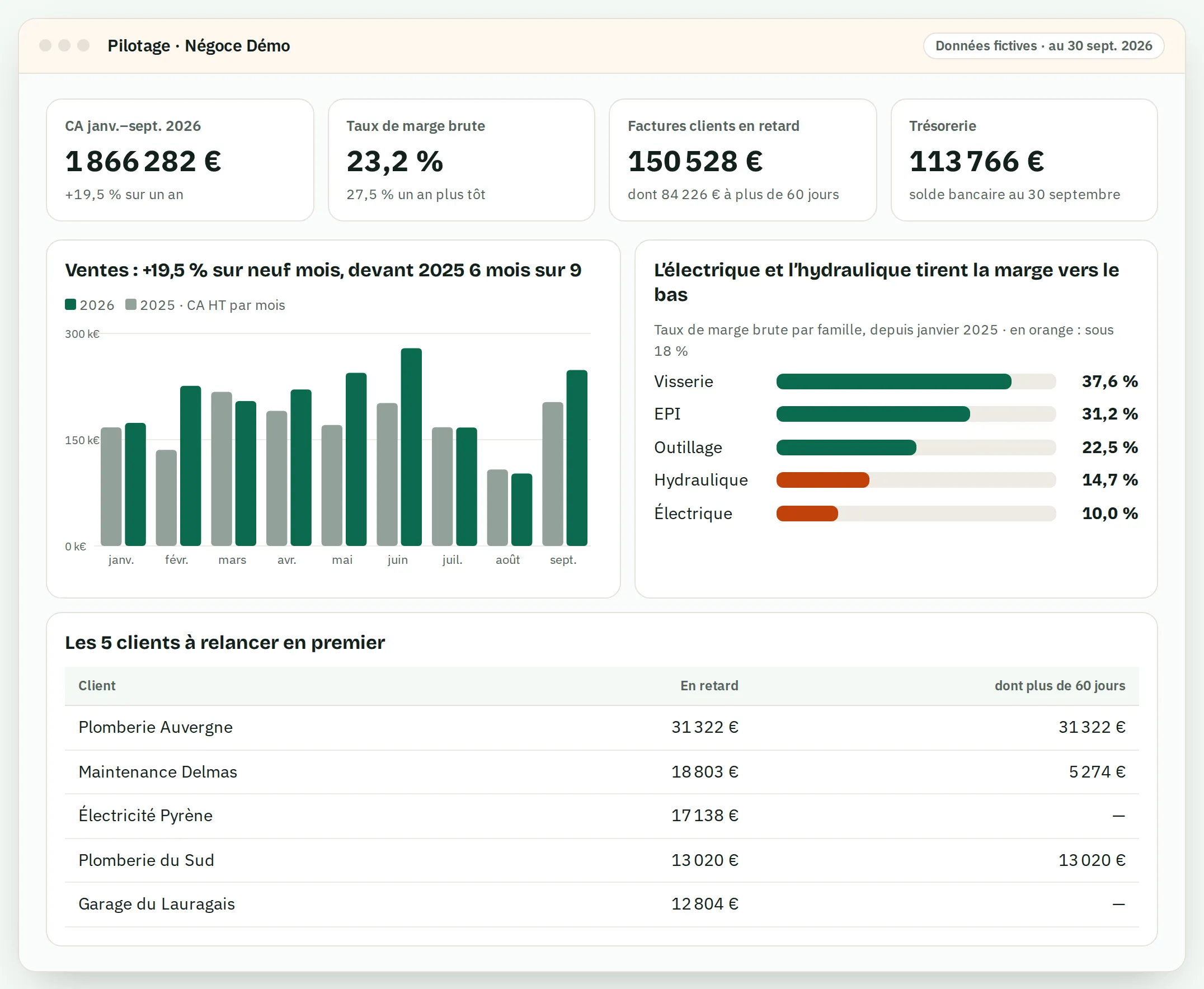
Sample dashboard built by KAVDAL on the sample database: fictional data.
In this example, sales are up 19.5% over nine months, but the margin rate falls from 27.5% to 23.2%: purchase prices rise faster than selling prices, and two item families barely earn anything anymore. That kind of signal does not show in the monthly trial balance, and it jumps out when accounting and sales data sit on the same page.
Refreshing the numbers automatically
Power BI Desktop is enough to build the dashboard. To publish it and keep it up to date without thinking about it, you need two things.
An on-premises data gateway. Your Sage database sits on a server in your network, which the Power BI service cannot reach on its own. The gateway is free Windows software that makes the link without opening any inbound port. Microsoft says not to install it on a domain controller, nor on a computer that sleeps, such as a laptop. And since Sage recommends keeping its database server dedicated, install it on another computer on the network that is always on.
A licence to share. Power BI Desktop is free. To publish and share a report, each person who views it needs a Pro licence, at €12.10 excl. VAT per user per month paid yearly according to Microsoft’s French pricing page, accessed on 28 October 2026. A Pro licence allows up to 8 scheduled refreshes a day.
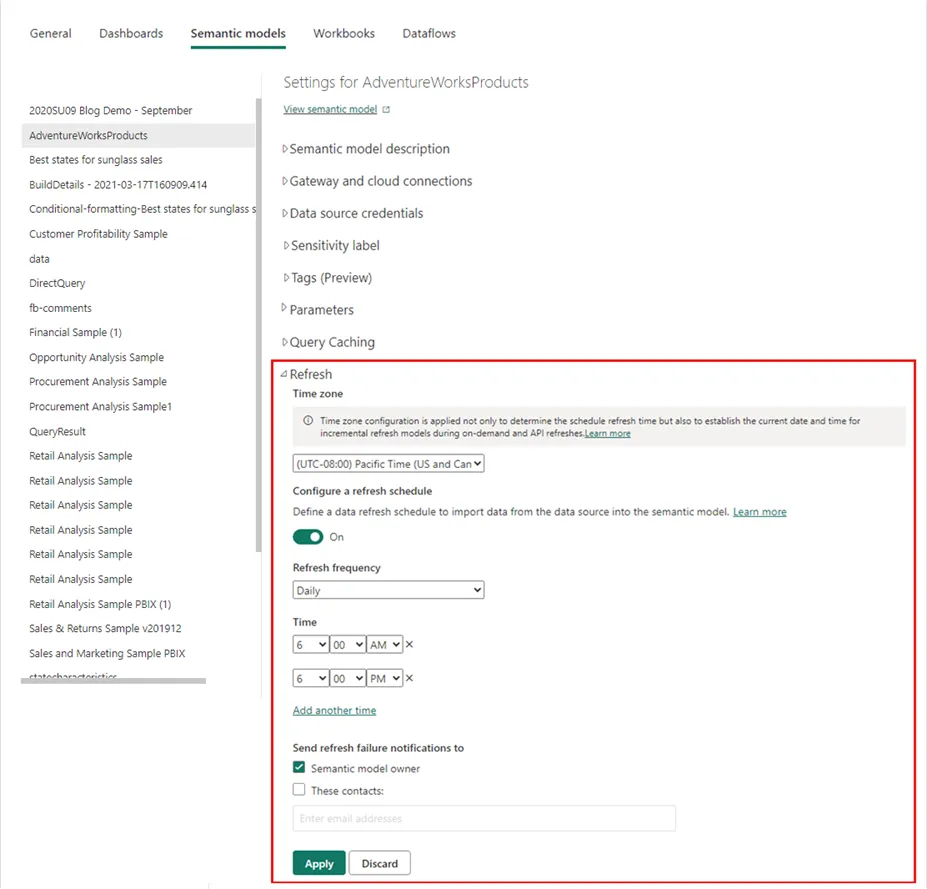
Screenshot: Microsoft, Power BI documentation (learn.microsoft.com), licensed CC BY 4.0, unmodified.
Two settings prevent bad surprises: an early-morning refresh, before people start entering data, rather than one in the middle of the day; and an address that receives failure alerts. Power BI pauses the refresh after two months without visits, and disables it after four failures in a row.
Traps that distort the numbers
- The wrong date.
EC_Dateis the entry date. A March invoice entered in April would land in April: useJM_DateandEC_Jour. - The direction of entries. Always read an amount with
EC_Sens: revenue on the credit side, expenses on the debit side. - Kits. Without the
DL_Valorise = 1filter, an item sold as a kit counts twice: the kit and its components. - Customers and suppliers mixed up.
F_COMPTETholds both: filter onCT_Type. - Document numbers. A
DO_Pieceis unique only together with itsDO_Type: a quote and an invoice can share a number. - Several companies. One database per company file: in Power BI, append each database’s query with a “Company” column.
- Old financial years. Archived years may leave the current database. For a multi-year history, ask where the archives are.
- Analytic accounting. Analytic axes live in
F_ECRITUREA, up to ten plans: always filter on one plan, or amounts add up. - The Sage version. The structure changes between versions: use the “Structure des bases” document for your version.
Would you rather we did it?
Connecting Sage 100 is the technical part. The real work is choosing the few numbers you act on, and checking they match your accounts to the cent. KAVDAL builds these dashboards for small and mid-sized businesses: a first dashboard from €1,500, net price (VAT not applicable, art. 293 B of the French Tax Code), read-only on your Sage database, and you own the result. You can also browse our sample dashboards, open without a form. We work remotely across France, and on site in Toulouse and Lyon.
Sources
- Sage France, “Compatibilité des versions de l’offre Sage 100” (September 2026): SQL Server is the only engine listed from V3 to V12; Sage ODBC out of maintenance since 31 May 2023, no V10, V11 or V12 release — accessed 28 Oct 2026
- Sage France, “Sage 100 Recommandations techniques” V12 (2026): SQL Server Express for Essentials and Standard, SAGE100 instance, one SQL database per company file, the .mae file holds the connection settings, Windows or mixed authentication — accessed 28 Oct 2026
- Sage France, “Structure des bases Sage 100” V12.25 (July 2026): tables F_ECRITUREC, F_COMPTET, F_DOCENTETE, F_DOCLIGNE, codes EC_Sens, DO_Type, DO_Provenance, and the rule on modifying secured records — accessed 28 Oct 2026
- Sage Community Hub, answer from a Sage employee, 11 March 2024: read-only access through Microsoft’s SQL driver, writing through Objets Métiers; the Sage ODBC driver no longer sold since November 2022 — accessed 28 Oct 2026
- Microsoft Learn, Power Query “SQL Server database” connector: Import and DirectQuery modes, SQL statement in advanced options — accessed 28 Oct 2026
- Microsoft Learn, “Database-level roles”: db_datareader can read all data from all user tables and views — accessed 28 Oct 2026
- Microsoft Learn, “Install an on-premises data gateway”: Windows software, outbound connections only, not on a domain controller or a computer that sleeps — accessed 28 Oct 2026
- Microsoft Learn, “Configure scheduled refresh”: 8 refreshes a day with Pro, paused after two months without visits, disabled after four failures — accessed 28 Oct 2026
- Microsoft, “Power BI pricing” page (France): Power BI Desktop free; Pro €12.10 and Premium Per User €20.80 excl. VAT per user per month, paid yearly — accessed 28 Oct 2026
Your numbers up to date every morning, combined from your software: a first dashboard from €1,500.VAT not applicable, art. 293 B of the French Tax Code.