Connect Cegid (France) to Power BI: a step-by-step guide
Connect Power BI to Cegid: identify your version, read the SQL Server database read-only, the useful tables, three tested queries, or use the API and the FEC.
Yes, Power BI can read your Cegid figures, but how depends on which Cegid product you use. Cegid is a French business software vendor, and this guide covers its products sold in France. Cegid installed on your own premises, such as XRP Sprint On Premises, stores its data in Microsoft SQL Server, which the free Power BI Desktop reads with its built-in connector. For Cegid online (XRP Sprint SaaS, XRP Flex, Cegid Loop…), Cegid runs the database and its technical requirements make no provision for accessing it: you go through the vendor’s APIs, or through the FEC, the French statutory accounting entries file that accounting software can export.
So this guide starts by identifying your version. It then details Cegid XRP Sprint installed on SQL Server, Cegid’s ERP for small and mid-sized businesses, with the useful tables and three queries tested on a sample database we built in SQL Server. It uses Cegid’s table and field names, with a made-up company and made-up figures. Most screenshots are in French, like Cegid itself.
Which Cegid do you have?
“Cegid” is a brand, not a single product. Here are its main business products, and what each one means for Power BI:
| Software | For whom | Where the data lives | Route to Power BI |
|---|---|---|---|
| Cegid XRP Sprint (formerly Yourcegid Y2, successor to Cegid Business V7 to V9) | Small and mid-sized businesses | SQL Server on your premises, or at Cegid as SaaS | SQL Server connector; for SaaS, Cegid’s Web APIs |
| Cegid XRP Flex | Small and mid-sized businesses | SaaS at Cegid, built on the Acumatica ERP | An API, to be confirmed by your integrator |
| Cegid XRP Ultimate (formerly Qualiac) | Mid-market and large companies | Oracle or SQL Server, installed or SaaS | Cegid’s Power BI connector, with the QueryBI module |
| Cegid PMI | Manufacturing SMEs | SQL Server on your premises, or at Cegid (Citrix) | SQL Server connector, on a different structure from this guide |
| Cegid Quadra Entreprise | Small and mid-sized businesses | Installed without SQL Server, or online (Citrix) | The FEC |
| Cegid Loop | Accounting firms | Online | The Cegid Loop API |
Two clues tell you where your data lives. If you open Cegid through a cegid.com address, or through a Citrix session provided by Cegid, it is hosted by Cegid. If it runs on a company server, it is installed on your premises. When in doubt, your IT team or Cegid reseller can tell you in a minute.
Watch out for a namesake: since 2024, “Cegid Business” also refers to a management platform for very small businesses and their accountant, unrelated to the former Cegid Business ERP that XRP Sprint replaced.
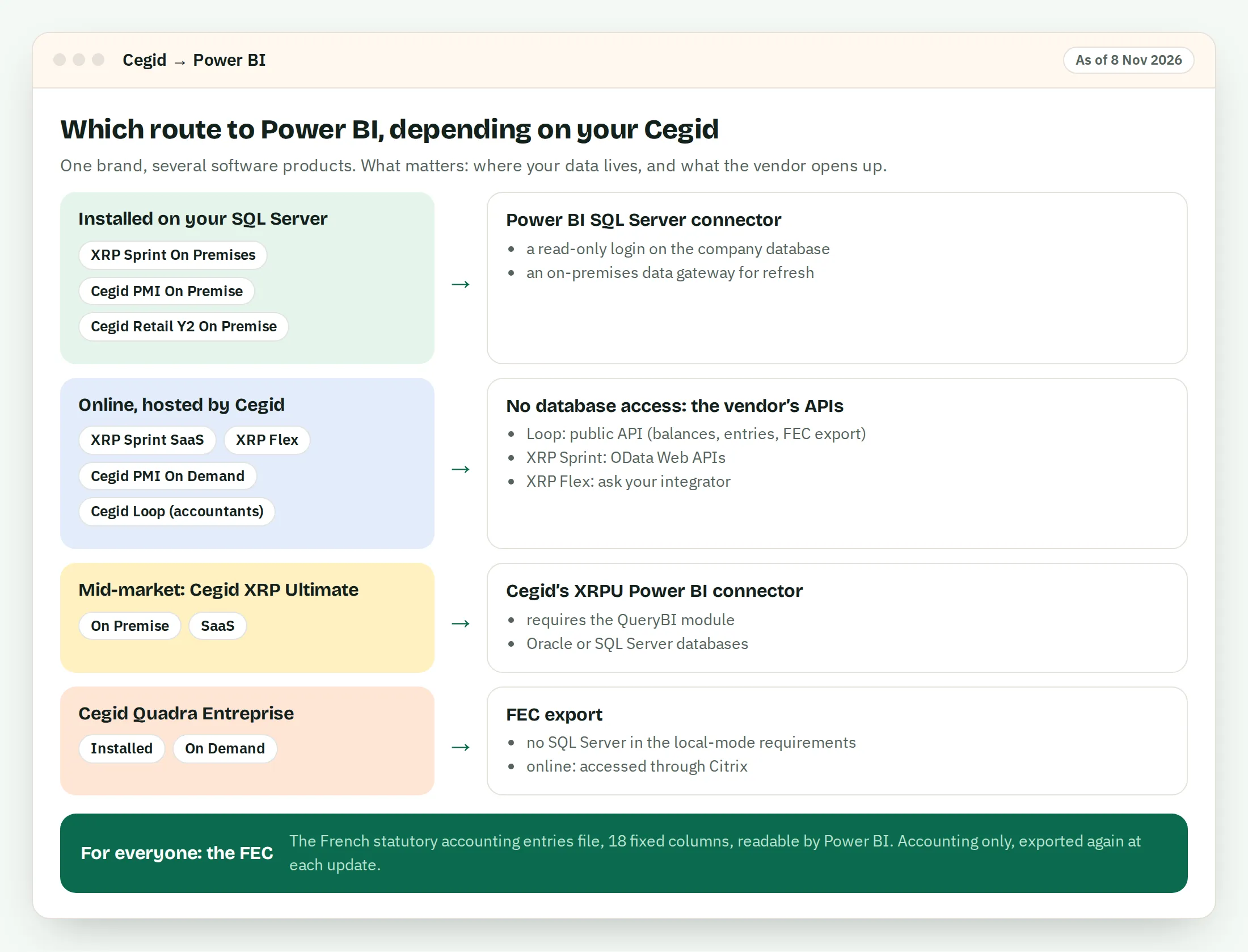
KAVDAL diagram, based on Cegid’s technical requirements (2022 to 2026) and Cegid’s developer portal.
Cegid installed: connect Power BI to the SQL Server database
1. Find the server and your company database
An installed Cegid XRP Sprint runs on SQL Server, Standard or Enterprise edition: Cegid has tested versions 2016 to 2022, and does not support the free Express edition on a server. You need the SQL server name, and the name of the database holding your company file. Your administrator can list the databases that contain a Cegid entries table:
-- Databases on the server that contain an ECRITURE table
SELECT name AS Base
FROM sys.databases
WHERE OBJECT_ID(QUOTENAME(name) + '.dbo.ECRITURE') IS NOT NULL;
Each company file is created from a template database: one more company usually means one more database.
2. Create a read-only account
Never connect Power BI with an account that can change the database. Cegid has a tool that checks the consistency of its entries (financial year, matching, opening balances) and lists any discrepancies: an entry changed through SQL, outside the software, is exactly the kind of thing that creates them.
Cegid XRP Sprint requires integrated Windows authentication: all servers and workstations are joined to the company’s Active Directory domain. The simplest option is therefore a domain Windows account with only the db_datareader role, which can read every table and nothing else. Your administrator or Cegid reseller runs this once:
-- On Cegid XRP Sprint's SQL server (Windows authentication)
CREATE LOGIN [MYDOMAIN\powerbi-read] FROM WINDOWS;
USE [MY_CEGID_DATABASE];   -- your company database
CREATE USER [MYDOMAIN\powerbi-read] FOR LOGIN [MYDOMAIN\powerbi-read];
ALTER ROLE db_datareader ADD MEMBER [MYDOMAIN\powerbi-read];
We tested the same approach on our sample database, with a SQL login: it reads all 11,400 entries, and SQL Server refuses any change or deletion. Cegid PMI, for its part, requires a SQL Server instance in mixed authentication mode: a SQL login limited to reading works there too.
One more rule: do not create your own views in the Cegid database. When upgrading to XRP Sprint, Cegid’s tool checks the syntax of added views and can stop the migration. Keep your queries in Power BI.
3. Connect Power BI Desktop
In the free Power BI Desktop: Get data, then SQL Server database.
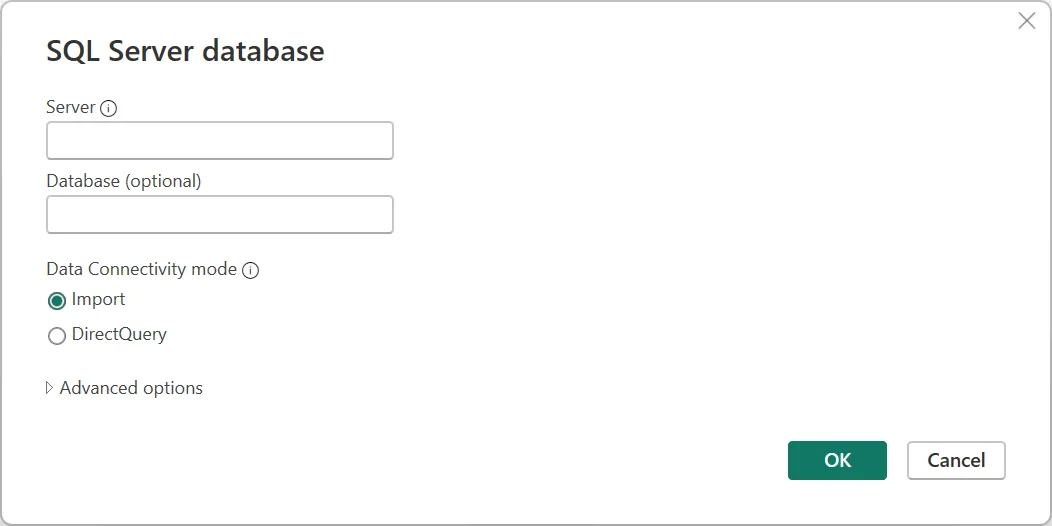
Screenshot: Microsoft, Power BI documentation (learn.microsoft.com), licensed CC BY 4.0, unmodified.
- Server: Cegid’s SQL server name, followed by the instance if there is one (
ERP-SRV\INSTANCE). - Database: your company database name.
- Mode: Import. Power BI copies the data at refresh time instead of querying the live database at every click. Cegid itself recommends dedicating the database engine to its software, partly to keep performance under control.
- Advanced options: paste one of the queries below there, so you load only the columns you need.
The Cegid tables you need
Cegid XRP Sprint, Yourcegid Y2 and the former Cegid Business share the same family of tables: upper-case names (ECRITURE, TIERS, PIECE, LIGNE, French for entry, third party, document and line), and fields that start with a prefix specific to each table (E_ for entries, T_ for third parties, GP_ for documents, GL_ for their lines).
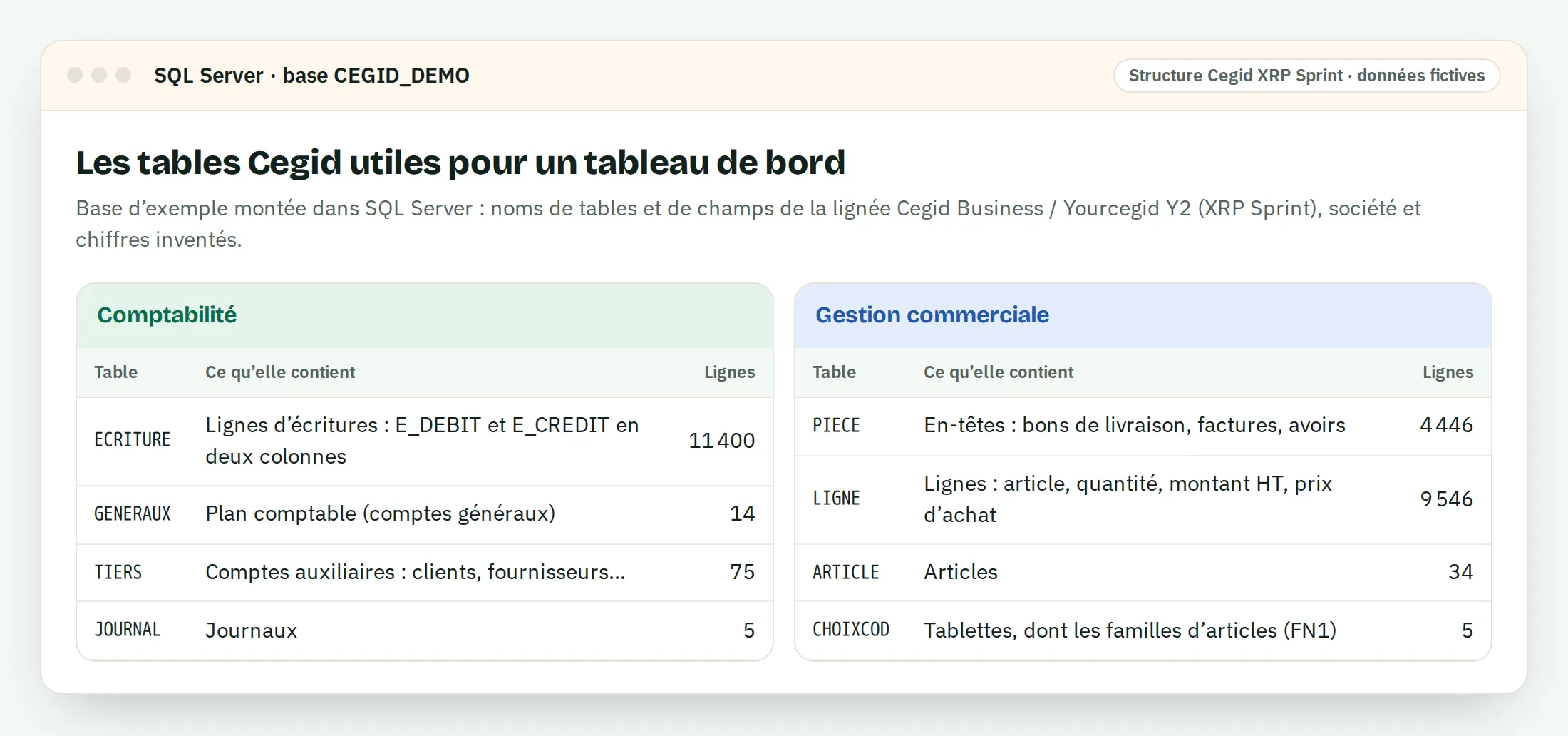
Sample database built by KAVDAL in SQL Server: Cegid XRP Sprint structure, fictional data.
We did not find a complete public description of the database, like the one Sage publishes for Sage 100. The fields below come from the XRP Sprint online help and Cegid’s technical notes, supplemented by queries published by an accounting software vendor, a forum and a teaching resource:
| Table | Field | What to know |
|---|---|---|
| ECRITURE | E_DATECOMPTABLE, E_EXERCICE |
The accounting date, and the financial year of the entry |
| ECRITURE | E_GENERAL, E_AUXILIAIRE |
The general ledger account, and the third-party account (customer, supplier) |
| ECRITURE | E_DEBIT, E_CREDIT |
Debit and credit in two columns: no direction code to decode |
| ECRITURE | E_ECRANOUVEAU |
N for an ordinary entry; another value on opening-balance and closing journals |
| ECRITURE | E_ETATLETTRAGE |
TL = fully matched, PL = partially matched, RI = account that is never matched |
| ECRITURE | E_DATEECHEANCE |
The due date, for late payments |
| TIERS | T_AUXILIAIRE, T_LIBELLE, T_NATUREAUXI |
The code, name and type of the third party (customer, supplier, employee…) |
| LIGNE | GL_NATUREPIECEG, GL_SOUCHE, GL_NUMERO, GL_INDICEG |
The document type (FAC customer invoice, AVC customer credit note, BLC delivery note) and its key, the same as in PIECE (GP_…) |
| LIGNE | GL_QTEFACT, GL_TOTALHT, GL_DPA |
Quantity, amount excl. VAT, and the purchase price carried on the line |
| LIGNE, CHOIXCOD | GL_FAMILLENIV1; CC_TYPE = 'FN1' |
The item family, whose label is stored in CHOIXCOD |
Three ready-to-copy queries
They run as-is on our sample database (SQL Server 2022), with the read-only account. On your own database, check the results with your accountant before you rely on them.
Monthly revenue (accounting)
-- Monthly revenue excl. VAT, from accounting (accounts 70)
SELECT DATEFROMPARTS(YEAR(E_DATECOMPTABLE), MONTH(E_DATECOMPTABLE), 1) AS Mois,
       SUM(E_CREDIT - E_DEBIT) AS CA_HT
FROM ECRITURE
WHERE E_GENERAL LIKE '70%'
  AND E_ECRANOUVEAU = 'N'   -- no opening balances or closing entries
GROUP BY DATEFROMPARTS(YEAR(E_DATECOMPTABLE), MONTH(E_DATECOMPTABLE), 1)
ORDER BY Mois;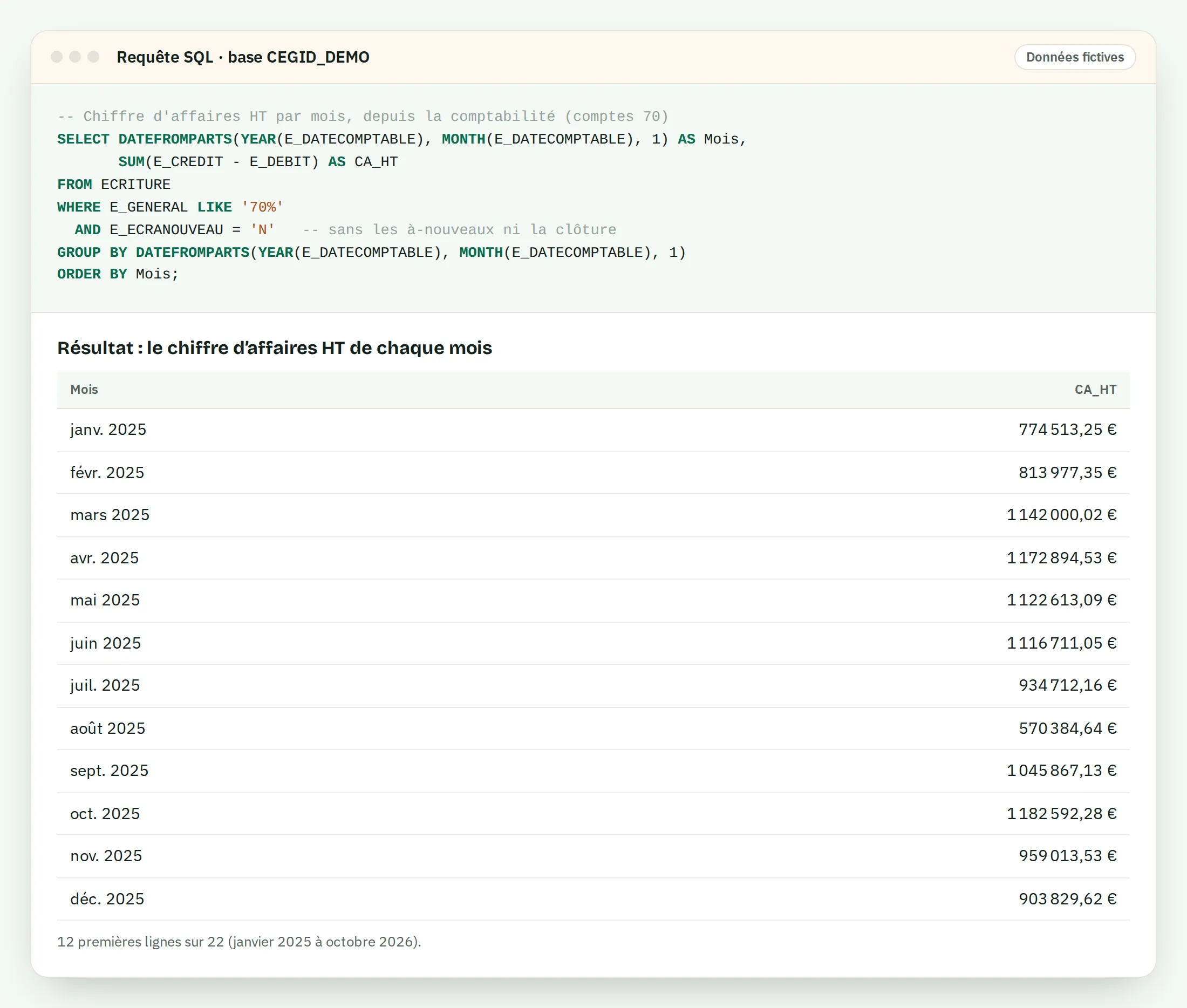
Result on the sample database, fictional data.
Revenue sits on the credit side: you take credit minus debit, so a credit note posted as a debit is deducted.
Gross margin by item family (sales management)
Start by checking which document types your database holds, with their count and total:
SELECT GL_NATUREPIECEG AS Nature,
       COUNT(DISTINCT CONCAT(GL_SOUCHE, '-', GL_NUMERO, '-', GL_INDICEG)) AS Pieces,
       SUM(GL_TOTALHT) AS Total_HT
FROM LIGNE
GROUP BY GL_NATUREPIECEG
ORDER BY Pieces DESC;
In our sample database, delivery notes (BLC) and invoices (FAC) have exactly the same total: every sale appears twice. Adding up all the lines would double revenue. So keep only invoices and credit notes:
-- Gross margin by item family, from sales management
SELECT f.CC_LIBELLE AS Famille,
       SUM(s.Signe * l.GL_TOTALHT) AS CA_HT,
       SUM(s.Signe * (l.GL_TOTALHT - l.GL_QTEFACT * l.GL_DPA)) AS Marge_HT
FROM LIGNE AS l
CROSS APPLY (SELECT CASE l.GL_NATUREPIECEG WHEN 'AVC' THEN -1 ELSE 1 END AS Signe) AS s  -- credit notes stored as positive: to check
LEFT JOIN CHOIXCOD AS f ON f.CC_TYPE = 'FN1' AND f.CC_CODE = l.GL_FAMILLENIV1
WHERE l.GL_NATUREPIECEG IN ('FAC', 'AVC')   -- customer invoices and credit notes: not delivery notes
GROUP BY f.CC_LIBELLE
ORDER BY Marge_HT DESC;
Three choices to validate on your own file. Credit notes: the check query shows whether they are stored as positive amounts (subtract them, as here) or already negative (replace -1 with 1). Cegid also has several credit note types: keep the ones your check query shows. And the cost: GL_DPA is the purchase price carried on the line, the one Cegid multiplies by GL_QTEFACT to value purchases in the EU goods trade declaration. If your stock is valued differently (weighted average cost, cost price), your financial controller will choose the right price.
Overdue customer invoices (accounting)
-- Customer invoices not fully settled, by days overdue
DECLARE @Au date = CAST(GETDATE() AS date);
SELECT t.T_LIBELLE AS Client,
       SUM(CASE WHEN e.E_DATEECHEANCE >= @Au THEN e.E_DEBIT - e.E_CREDIT ELSE 0 END) AS Non_echu,
       SUM(CASE WHEN DATEDIFF(day, e.E_DATEECHEANCE, @Au) BETWEEN 1 AND 30 THEN e.E_DEBIT - e.E_CREDIT ELSE 0 END) AS Retard_1_30_j,
       SUM(CASE WHEN DATEDIFF(day, e.E_DATEECHEANCE, @Au) BETWEEN 31 AND 60 THEN e.E_DEBIT - e.E_CREDIT ELSE 0 END) AS Retard_31_60_j,
       SUM(CASE WHEN DATEDIFF(day, e.E_DATEECHEANCE, @Au) > 60 THEN e.E_DEBIT - e.E_CREDIT ELSE 0 END) AS Retard_plus_60_j
FROM ECRITURE AS e
JOIN TIERS AS t ON t.T_AUXILIAIRE = e.E_AUXILIAIRE
WHERE e.E_GENERAL LIKE '411%'
  AND e.E_ETATLETTRAGE <> 'TL'   -- not fully matched
  AND e.E_ECRANOUVEAU = 'N'
GROUP BY t.T_LIBELLE
ORDER BY SUM(CASE WHEN e.E_DATEECHEANCE < @Au THEN e.E_DEBIT - e.E_CREDIT ELSE 0 END) DESC;
A customer line that is not fully matched has not been completely reconciled with a payment. A partially matched invoice (PL) is reduced by its partial payment, but each falls into the bucket of its own due date: if you often match partially (deposits, instalments), compare the result with Cegid’s due-date schedule for a few customers, especially early in the financial year, when old invoices may have been carried forward as opening balances.
The resulting dashboard
With these queries and the bank account balance, accounting and sales fit on a single page, the one you open on Monday morning.
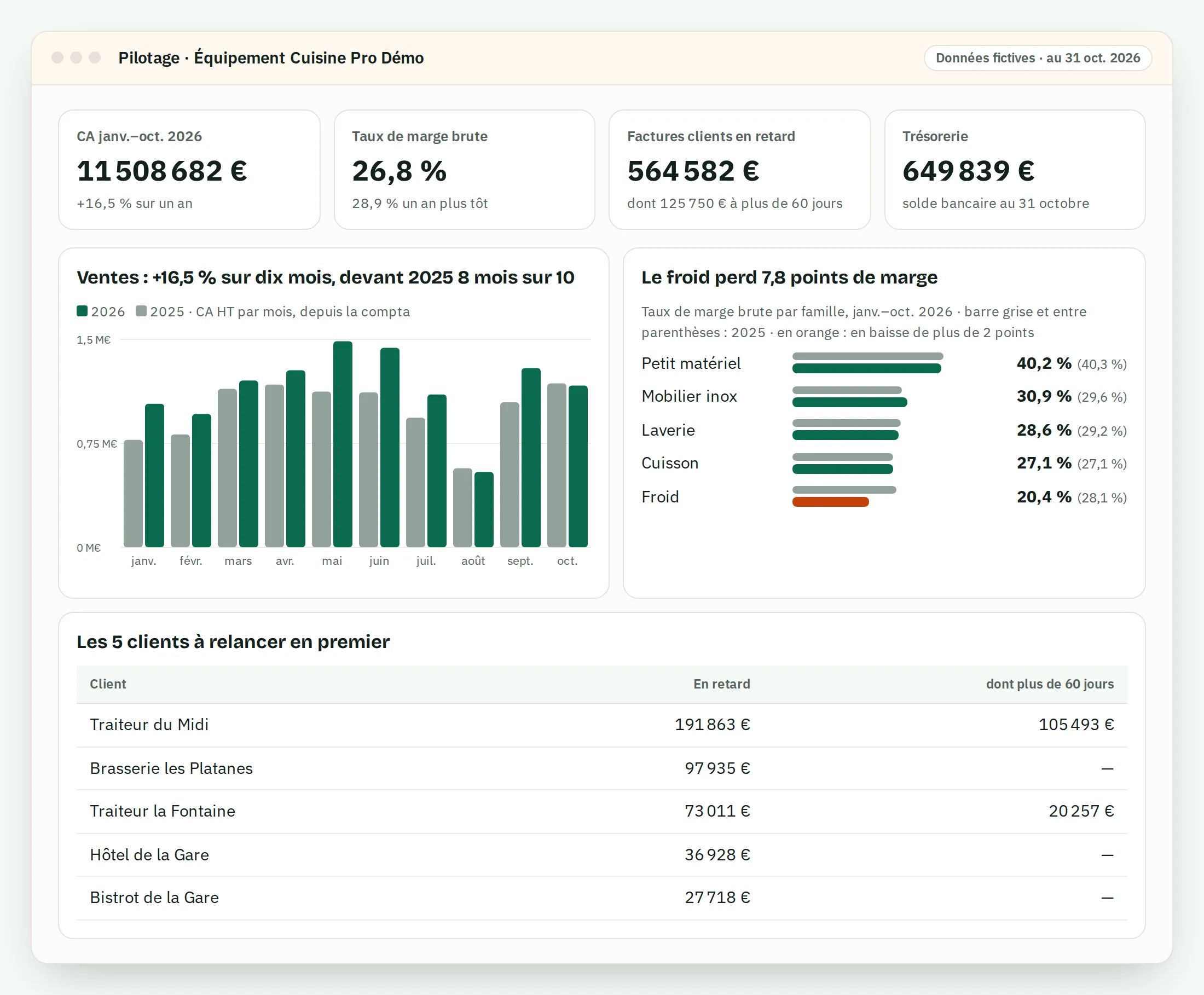
Sample dashboard built by KAVDAL on the sample database: fictional data.
In this example, sales are up 16.5% over ten months, but the margin rate falls from 28.9% to 26.8%. The cause sits on a single line: refrigeration drops from 28.1% to 20.4% margin, because its purchase prices rose much faster than its selling prices. And one customer alone, Traiteur du Midi, holds more than €105,000 of invoices over 60 days. That kind of finding shows neither in the trial balance nor in the order book, and it jumps out when both sit on the same page.
Cegid installed or online, we take the right route (read-only database, API or FEC) and deliver a first dashboard checked to the cent against your accounts, from €1,500.VAT not applicable, art. 293 B of the French Tax Code.
Cegid online: go through the APIs
When Cegid hosts the software, it also runs the database, and the technical requirements of its online offers mention no SQL access for the customer. What remains is what the vendor opens up:
- XRP Sprint SaaS. Cegid Data Service publishes OData Web APIs built on a library of views, including in On Demand mode. Power BI can read that format with its OData Feed connector. The September 2024 documentation mainly details the payroll views: ask your integrator which ones exist for accounting and sales.
- XRP Flex. It is built on the American ERP Acumatica, whose documentation describes an OData interface for Excel and Power BI. Cegid does not document it publicly for XRP Flex: that is the first question to ask your integrator.
- XRP Ultimate. Cegid lists an “XRPU Power BI connector”, installed or SaaS, subject to the QueryBI module. That is the official route, to request from Cegid.
- Cegid Loop, if your accounting firm keeps your books there. Its public API provides balances (general, third-party, analytic), entries (100 per call, with a mandatory filter) and an FEC export still in preview. For large volumes, Cegid’s “Sink” pushes every change to Azure or AWS storage, from which a database of your own can feed Power BI. The standard API key is free; the accounting-firm key is billable.
- Quadra Entreprise. Installed, it does not require SQL Server; online, it is accessed through Citrix. The FEC is the simplest route.
The route that works everywhere: the FEC
Accounting software in France produces the FEC (fichier des écritures comptables), the accounting entries file required in a tax audit. Its format is set by article A47 A-1 of the French Livre des procédures fiscales: 18 columns in a fixed order (JournalCode, EcritureDate, CompteNum, CompAuxNum, Debit, Credit, EcritureLet…), separated by a tab or the | character, with a decimal comma and dates in YYYYMMDD format.
In Power BI: Get data, then Text/CSV, and pick the right delimiter. Then change the type of Debit and Credit to decimal number using the French locale, and convert the dates with a custom column: Date.FromText(Text.From([EcritureDate]), [Format = "yyyyMMdd"]).
Two limits: the FEC holds accounting only (no invoice lines, no item families, so no margin by product), and you have to export it again at every update. Saved to SharePoint or OneDrive, replacing the previous one, it refreshes without a gateway.
Refreshing the numbers automatically
For a database installed on your premises, you need an on-premises data gateway, free Windows software installed on a network computer that is always on. Since Cegid recommends dedicating the database server to its software, install it on another machine. For a source that is already online and that Power BI reaches directly (an API, a file in SharePoint), Microsoft says no gateway is needed.
Either way, each person who views the published report needs a Power BI Pro licence: €12.10 excl. VAT per user per month paid yearly, according to Microsoft’s French pricing page accessed on 8 November 2026. It allows up to 8 scheduled refreshes a day. We detail these settings in our guide Connect Sage 100 to Power BI.
Traps that distort the numbers
- Delivery notes and invoices in the same tables.
PIECEandLIGNEalso hold quotes, orders and deliveries: always filter on the document type (FAC,AVC). - Opening balances and closing entries. Entries whose
E_ECRANOUVEAUis anything other thanNcopy balances. For a total across several financial years, exclude them. For a bank balance, take the current year including its opening balance. - Entries that are not final. Cegid handles simulation entries, with their own counter. Entries also carry an
E_QUALIFPIECEfield whose values Cegid does not publish: list those in your database before filtering, and have your integrator confirm them. - Foreign-currency amounts. Cegid also stores amounts in the entry currency (
E_DEBITDEV,E_CREDITDEV): for a total in euros, stick toE_DEBITandE_CREDIT, and check on a foreign-currency invoice. - Shared tables. A table shared by several company files can be redirected to another database. If a table looks empty, ask your integrator where it lives.
- Several companies. Usually one database per company file: in Power BI, append each database’s query with a “Company” column.
- Version upgrades. During migrations, Cegid already checks the syntax of views added to its database. Retest your Power BI queries too after every major version.
Would you rather we did it?
Connecting Cegid is the technical part. The real work is choosing the few numbers you act on, linking accounting and sales cleanly, and checking everything matches to the cent. KAVDAL builds these dashboards for small and mid-sized businesses: a first dashboard from €1,500, net price (VAT not applicable, art. 293 B of the French Tax Code), read-only on your Cegid database or from your exports, and you own the result. You can also browse our sample dashboards, open without a form, or our guides for Sage 100 and EBP. We work remotely across France, and on site in Toulouse and Lyon.
Sources
- Cegid, “Prérequis techniques Cegid XRP Sprint On Premises”, version 6.01 of 27/06/2024: SQL Server 2016 to 2022, Standard or Enterprise edition, SQL Express not supported on a server, integrated Windows authentication required, Web API and ERP Data Service — accessed 8 Nov 2026
- Cegid, “Prérequis techniques Cegid XRP/HR Sprint SaaS”, version 6.03 of 27/06/2024: a solution “published, hosted and operated by Cegid”, accessed through Cegid QuickLaunch — accessed 8 Nov 2026
- Cegid, “Cegid XRP Sprint – Cegid Data Services” (September 2024): standard OData Web APIs built on a library of views (documented for payroll), also available On Demand — accessed 8 Nov 2026
- Cegid, technical note “Migration de bases de V7, V8 ou V9 vers Cegid XRP Sprint”, version 3.00 of 13/11/2019: migration from Cegid Business V7 to V9, syntax check of added views, DESHARE redirections specific to each database — accessed 8 Nov 2026
- Cegid, technical note “SQL PGI”, version 2.00 of 02/04/2019: queries translated for SQL Server, Oracle or SQLite; item families in CHOIXCOD (FN1, FN2); DETABLES table; PGI_SHARED_DB — accessed 8 Nov 2026
- Cegid XRP Sprint online help, “Rapport sur les erreurs” (accounting): ECRITURE, GENERAUX, TIERS and JOURNAL tables; fields E_JOURNAL, E_GENERAL, E_EXERCICE, E_ECRANOUVEAU, E_ETATLETTRAGE (TL, PL, RI), E_DEBITDEV, T_AUXILIAIRE, T_LIBELLE, J_COMPTEURSIMUL — accessed 8 Nov 2026
- Cegid XRP Sprint online help, “Formatage des champs de liaison pièces”: PIECE and LIGNE tables, key GL_NATUREPIECEG, GL_SOUCHE, GL_NUMERO, GL_INDICEG, GL_NUMORDRE — accessed 8 Nov 2026
- Cegid XRP Sprint online help, “Déclaration d’échanges de biens – Vue d’ensemble”: document types FAC (customer invoice), AVC (customer credit note), BLC (customer delivery note) — accessed 8 Nov 2026
- Cegid XRP Sprint online help, column mapping for the EU goods trade declaration (DEB): purchase value GL_QTEFACT × GL_DPA — accessed 8 Nov 2026
- CERTA teachers’ network, “Architecture technique des PGI”, June 2009: a Cegid Business Suite query on the ECRITURE table (E_DATECOMPTABLE, E_AUXILIAIRE, E_DEBIT, E_CREDIT); MODELE_ENTP template database — accessed 8 Nov 2026
- MyUnisoft (accounting software vendor), “Import CEGID : requête mode SaaS hébergé”, edited 27/04/2026: a query on ECRITURE joined to GENERAUX, TIERS and JOURNAL, with the E_DATEECHEANCE column — accessed 8 Nov 2026
- developpez.net forum, “Compta CEGID Y2 : accéder par une requête SQL aux tables libres” (2019 and 2023): GL_TOTALHT and GL_FAMILLENIV1 in the LIGNE table — accessed 8 Nov 2026
- Le Monde Informatique, 15 April 2019: “Qualiac becomes XRP Ultimate and YourCegid is renamed XRP Sprint”, launch of XRP Flex — accessed 8 Nov 2026
- Solutions Numériques, 23 April 2019: XRP Flex, a “fully localised version of the American cloud ERP Acumatica”, offered on Microsoft Azure — accessed 8 Nov 2026
- Cegid, “Prérequis techniques Cegid XRP Flex”, version 25.2 of 13/04/2026: a SaaS solution “hosted and operated by Cegid” — accessed 8 Nov 2026
- Acumatica, 2025 R1 documentation, “Generic Inquiry Access Through OData”: /api/odata/gi address, basic authentication or OAuth 2.0, Excel and Power BI as clients — accessed 8 Nov 2026
- Cegid, “Prérequis techniques Cegid XRP Ultimate J3 – On Premise” (08/12/2025): Oracle or SQL Server, “Connecteur XRPU Power BI” subject to the QueryBI module — accessed 8 Nov 2026
- Cegid, “Prérequis techniques Cegid PMI On Premise”, version 16.15 of 15/01/2024: dedicated SQL Server instance, mixed authentication; and “Cegid PMI On Demand” (16.13): SaaS solution hosted by Cegid — accessed 8 Nov 2026
- Cegid, “Prérequis techniques Cegid Quadra Entreprise – Mode local” (06/2022): data server with no SQL Server engine; “Cegid Quadra On Demand”: access through Citrix — accessed 8 Nov 2026
- Cegid Developers, Cegid Loop API, “Get started”: free Standard key, billable Advanced (accounting firm) key, subscription key obtained from Cegid — accessed 8 Nov 2026
- Cegid Developers, Cegid Loop API, “Balance”, “Écriture comptable”, “Sink” and “Export FEC” pages: balances through the API, 100 entries per call, sync to Azure Blob Storage or AWS S3, provisional FEC export in preview — accessed 8 Nov 2026
- Cegid, press release of 7 October 2024: launch of Cegid Quadra Plus and Cegid Business, an “all-in-one management and collaboration platform between the accountant and their clients” — accessed 8 Nov 2026
- Légifrance, article A47 A-1 of the French Livre des procédures fiscales: the first 18 FEC fields in order, tab or “|” separator, decimal comma, YYYYMMDD dates — accessed 8 Nov 2026
- Microsoft Learn, Power Query “SQL Server database” connector (Import and DirectQuery modes) and “Database-level roles” (db_datareader) — accessed 28 Oct 2026
- Microsoft Learn, Power Query “OData Feed” connector — accessed 8 Nov 2026
- Microsoft Learn, “Data refresh in Power BI”: a gateway is required without a direct network connection; no gateway for a directly reachable cloud source — accessed 8 Nov 2026
- Microsoft Learn, “Configure scheduled refresh”: 8 refreshes a day with Pro — accessed 28 Oct 2026
- Microsoft, “Power BI pricing” page (France): Power BI Desktop free; Pro €12.10 excl. VAT per user per month, paid yearly — accessed 8 Nov 2026
Cegid installed or online, we take the right route (read-only database, API or FEC) and deliver a first dashboard checked to the cent against your accounts, from €1,500.VAT not applicable, art. 293 B of the French Tax Code.