Cash flow plan: free Excel template and method
A 12-month cash flow plan: free Excel template, no macros, and a method to fill it in, track it against actual bank balances and spot a dip below your threshold.
Free Excel template
A 12-month cash flow plan, ready to fill in
A workbook with no macros and no sign-up form: enter your cash in and cash out, and the month-end balance and alert threshold calculate themselves.
- A month-by-month plan: cash in, cash out, month-end balance, and a chart against the alert threshold
- A status written in words for each month: OK, Watch, Alert
- An actuals tab that compares planned and actual figures each month, bank balance included
- Instructions explaining each line, with fictional example figures to replace
.xlsx file, 26 KB, no macros. No email address required.
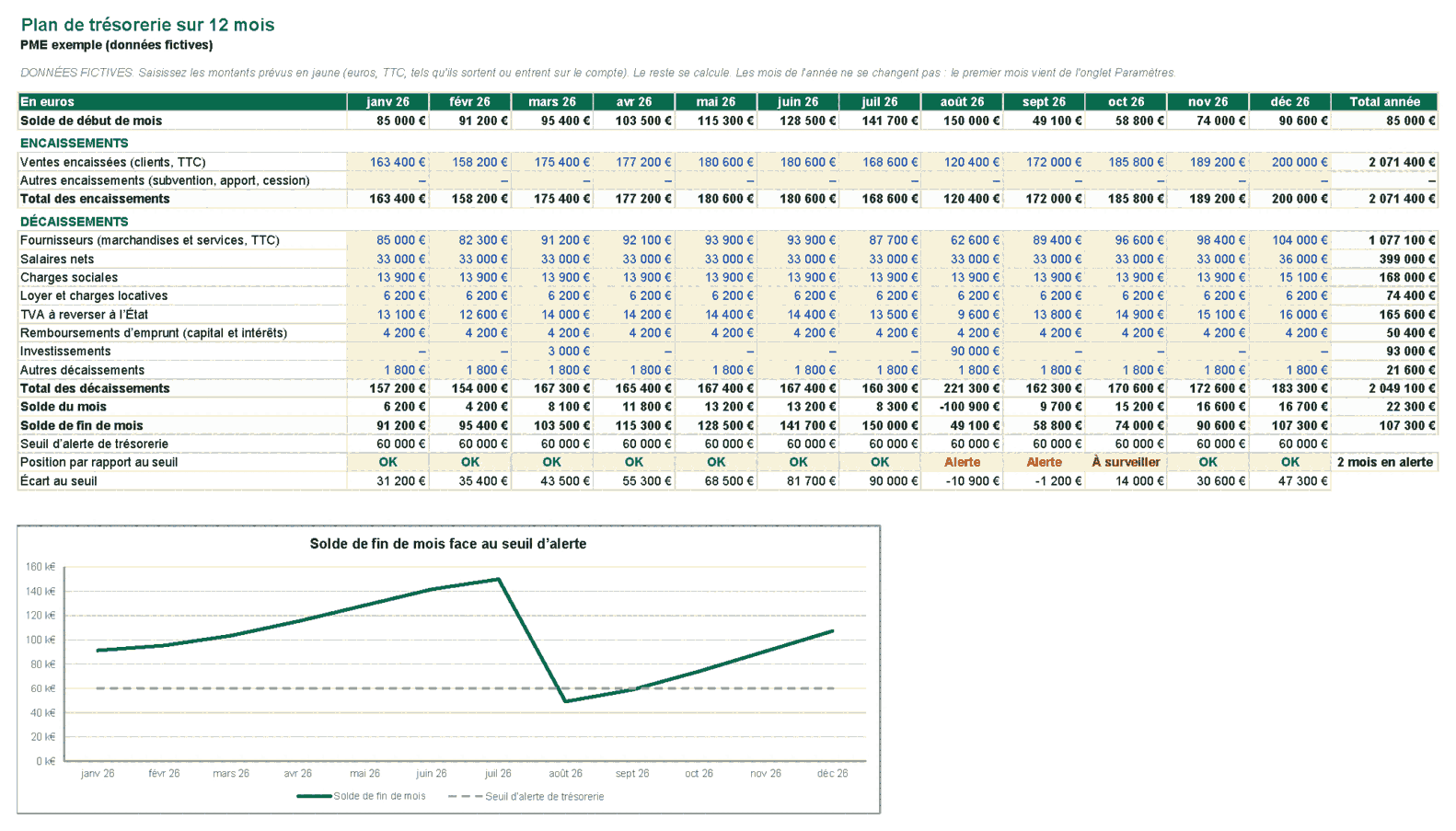
A cash flow plan answers one question: will the account hold enough money each month to pay suppliers, wages, taxes and loan instalments? The template above shows it over twelve months, with fictional data you replace with your own. The rest explains how each line is filled in, how to read the alert threshold, and when a spreadsheet stops being enough.
Cash flow plan, cash budget, cash forecast: what is the difference?
These three terms often describe the same document, but they serve different purposes.
- The cash flow plan is monthly and covers 6 to 12 months. It tracks cash movements: what actually enters and leaves the account, month by month, and the balance that results.
- The cash budget is the plan you commit to keep. It is the reference: each month, you compare actual figures with it.
- The cash forecast is an exercise in anticipation, often longer (one to three years), redone when a project changes the picture: a hire, an investment, a large new customer.
In practice, a small business does not keep three documents. It keeps one twelve-month plan, which serves as its budget, and updates it when an assumption changes. The template on this page does exactly that.
A cash flow plan is not an income statement. An invoice issued in March may only be paid in April, and an investment hits cash in full in the month it is paid, while the income statement spreads it over several years through depreciation. A profitable owner can therefore run short of cash: that is the first reason to keep a plan.
The cash flow template: what it contains
The file is an Excel workbook (.xlsx), with no macros, no external connection and no form to fill in to download it. It has five tabs:
| Tab | Role | What you do there |
|---|---|---|
| Plan de trésorerie (cash flow plan) | The 12-month plan, with the chart | Enter expected cash in and cash out |
| Suivi réel (actuals) | Planned against actual, month by month | Each month-end, enter the actual figures and the bank balance |
| Paramètres (settings) | Opening balance, alert threshold, margins | Set once, review each year |
| Notice (instructions) | The user guide | Read once |
| Bienvenue (welcome) | The KAVDAL introduction | Nothing |
Totals, balances, each month’s position and the variances are formulas. You only type into the yellow cells. The figures are fictional: an imaginary small business whose balance drops below the threshold in August, because of an investment paid in one go.
Note that the tab names and the instructions are in French, as the workbook is written for a French audience. The structure is the same in any language.
Filling in each line: cash in and cash out
One rule governs everything: record the month when the money actually enters or leaves the account, not the month when the invoice is issued or the expense booked.
Cash in
- Customer receipts (incl. VAT): payments received during the month. A customer who pays at 60 days counts in the month of payment, not the month of the invoice. Amounts are gross of VAT, because that is what reaches the account.
- Other receipts: grants, capital injections, disposals of equipment. They are rare, but a plan that forgets them always errs in the same direction.
Cash out
- Suppliers: purchases paid during the month, VAT included. An invoice paid at 30 days goes in the month it is paid.
- Net wages: what is paid to employees. Social contributions are on the next line.
- Social contributions: they leave the account on their own debit date, which does not always fall in the same month as payroll. Take the schedule from your employer account rather than guessing.
- Rent and service charges: the amount for the month, including service charge advances.
- VAT payable to the tax authority: the net amount of your return, in the month it is paid. The filing frequency depends on your VAT regime, monthly or quarterly. Check the due date in your professional account on impots.gouv.fr.
- Loan repayments: capital and interest for each instalment, as shown in your bank’s repayment schedule.
- Investments: a machine, a vehicle, software, in the month you pay for it. A single 90,000 € outlay weighs fully on that month, whereas the income statement only picks it up gradually through depreciation.
- Other payments: everything else. If a recurring cost is large, move it out of this line and track it separately.
The model then calculates total receipts and payments, the net movement of the month (receipts minus payments), and the month-end balance, which becomes the opening balance of the next month.
Reading the alert threshold and each month’s position
A positive balance means nothing until you know the level at which it becomes dangerous. The model therefore asks for an alert threshold, the lowest balance you accept, set in the Paramètres tab. Each month then receives a position, written in words:
- OK: the month-end balance is above the threshold with a margin.
- Watch (À surveiller): the balance stays above the threshold, but the margin is thin (25 % above the threshold by default, adjustable).
- Alert (Alerte): the balance falls below the threshold.
The word matters as much as the colour: in a black-and-white printout, or for a colour-blind reader, colour alone tells you nothing. In the example, the position goes from OK to Alert in August and September, then to Watch in October. That is the kind of month you prepare for weeks in advance: by shifting a payment, negotiating a payment plan, or arranging a credit line.
The threshold is not a universal figure. It depends on what a month of fixed costs costs you, and on how long it would take to obtain financing if the balance fell. Discuss it with your banker or accountant, starting from your fixed payments for the month.
Cash monitoring: planned against actual, every month
A plan is only useful when you test it against reality. The Suivi réel tab does this comparison. At each month-end, enter the actual receipts, the actual payments and the balance shown by the bank. The model calculates the variance for each line and a status for the balance:
- the variance on receipts is actual minus planned: a positive figure is good news;
- the variance on payments follows the same rule, but a positive figure means you spent more than planned;
- the balance status compares the bank with the plan: “OK” when the actual balance is at or above the plan, “Watch” when it is below the plan within the tolerance (5 % by default), “Alert” beyond that, and “Waiting” for months with no entry.
This tracking has a precise purpose: it shows where the plan goes wrong. If receipts hold and payments drift, the problem lies with suppliers or payroll. If it is the reverse, the collection process needs attention. A variance that repeats for three months running is an assumption to correct in the plan, not an accident.
Your numbers up to date every morning, combined from your software: a first dashboard from €1,500.VAT not applicable, art. 293 B of the French Tax Code.
Simplified cash flow plan: what you can keep over a year
A simplified cash flow plan fits on six lines: customer receipts, supplier payments, wages and social contributions, rent, VAT and loan repayments. It is enough for a small business with no heavy stock, few investments and little gap between invoicing and collection.
The full model adds what often makes the difference in tight periods: investments, other receipts and actual tracking. If your business is simple, keep the same plan and leave at zero the lines that do not apply to you: it stays comparable from one year to the next.
Mistakes that make a cash flow plan wrong
- Reasoning in turnover. Invoiced revenue is not cash collected. A plan built from invoices overstates cash by the whole payment delay.
- Forgetting VAT. It leaves the account on a fixed date, and can be heavier than expected after a large purchase. Plan it like any other payment.
- Putting social contributions in the payroll month. They leave later. The delay does not change the annual total, but it changes the month when the balance crosses the threshold.
- Forgetting annual payments. Insurance, property tax, annual subscriptions: a single yearly payment can wipe out three months of margin. Add them in the month they fall due.
- Never comparing with actuals. A plan you never check against the account becomes fiction. The monthly check takes ten minutes.
- A threshold picked at random. Without a threshold, the plan does not tell you when to act. Set it once, and agree it with your bank.
From the Excel template to automatic tracking
Excel is enough for a monthly plan kept by one person, fed by a few entries. The template becomes insufficient in four cases: you want to see the balance every morning, the plan must reflect the bank’s movements as they happen, several people need the same figures, or an entry error has already hidden an overdraft.
The next step is to connect the bank balance and the receipts and payments to a dashboard that updates by itself, with an alert when the balance approaches the threshold. That is what KAVDAL builds: dashboards connected to your software, where cash is one of the indicators. You can see a fictional example on the site, with no form. For the working capital calculation that drives much of the cash gap, see our working capital simulator.
Frequently asked questions
What is the difference between a cash flow plan and a cash budget?
The cash flow plan describes cash movements month by month and the balance that results. The cash budget is the plan you commit to keep, against which actuals are compared. In a small business it is often the same file, updated when an assumption changes.
How many months should a cash flow plan cover?
Twelve rolling months is the most common format: it covers a full year, with seasonal months, annual payments and VAT. A longer forecast, from one to three years, is done separately, when a project changes the level of costs.
What is the difference between cash monitoring and a plan?
The plan is what you expect. Cash monitoring is what happened, measured each month on the bank account. The template does both in the same workbook, so you can compare them.
Is the Excel template free, with no sign-up?
Yes. The file downloads directly, with no email address. It has no macros and no link to external sites, and its data is fictional: replace it with your own, following the Notice tab.
Your numbers up to date every morning, combined from your software: a first dashboard from €1,500.VAT not applicable, art. 293 B of the French Tax Code.